
# Welcome to OGP International

Open Government Products (OGP) builds technology for the public good. Our tools are designed by and for government teams, addressing real operational challenges with practical, secure solutions.

### What You'll Find Here

#### 🧪 Demos *(Coming Soon)*

Experience our products firsthand through live demonstrations. See how government teams worldwide use OGP solutions to improve citizen services and streamline operations.

#### :tools: Self-Hosting Guides

Deploy OGP products in your own infrastructure with comprehensive guides tailored for government IT teams. From evaluation to production deployment, we provide the technical guidance you need.

#### 🔧 Blueprints *(Coming Soon)*&#x20;

Proven patterns and architectural guidance for adapting OGP solutions and practices to your specific government context and requirements.

**Ready to get started?** Most teams begin with our demos to understand capabilities, then move to self-hosting guides for implementation planning.


# Demos

Experience OGP's products hands-on with our live demo environments. No installation, no setup - just explore and test how our tools work together.

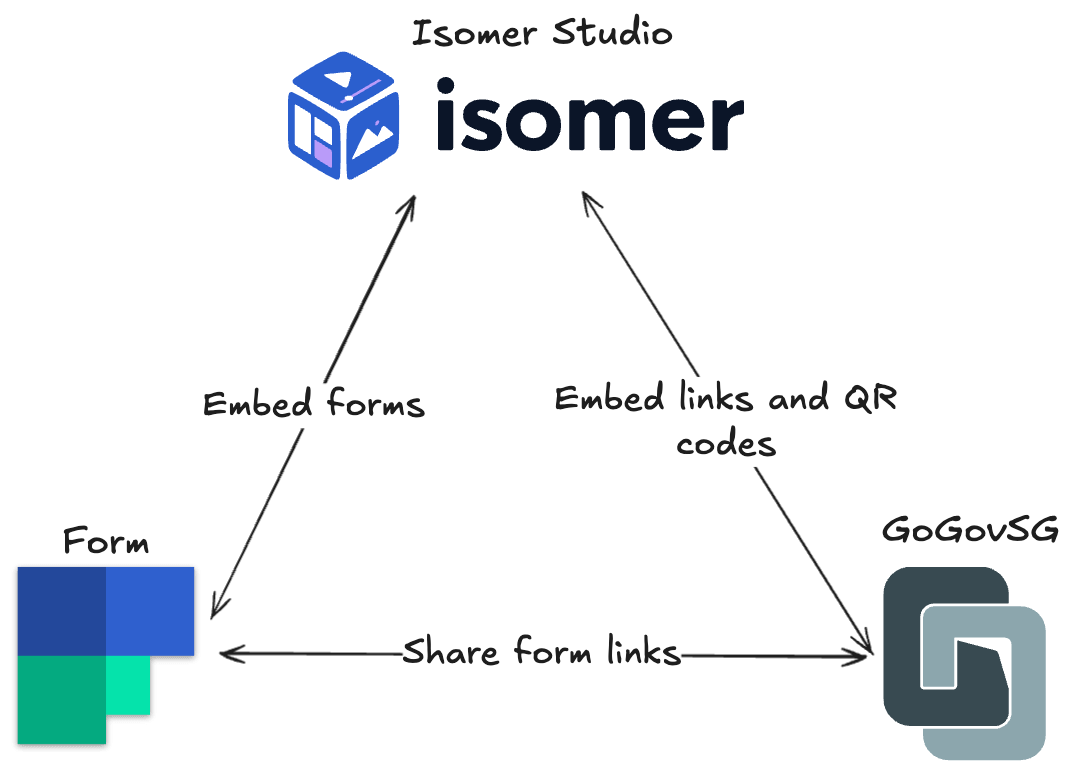
### Building Blocks in Action <a href="#building-blocks-in-action" id="building-blocks-in-action"></a>

<figure><img src="https://3225095994-files.gitbook.io/~/files/v0/b/gitbook-x-prod.appspot.com/o/spaces%2FFiAVh1Ff3KUiYxMAZuJG%2Fuploads%2FtpVvSa6JEn6sMahBhqIE%2Fform-go-isomer.png?alt=media&amp;token=fd3b111b-76ed-44db-9728-d3c0b9892660" alt=""><figcaption></figcaption></figure>

OGP products are designed to work independently or together as modular building blocks. Here's a real-world example:

1. **Create a form** with [FormSG](https://form.gov.sg/) to collect citizen feedback or applications
2. **Generate a short link** with [GoGovSG](https://go.gov.sg/) to make your form URL memorable and shareable
3. **Create a QR code** from your short link for physical materials
4. **Embed the form** in your government website built with [Isomer](https://www.isomer.gov.sg/)

All of this can be done in minutes.

## Available Demos

#### [FormSG Demo](/demos/form) <a href="#f0-9f-93-8b-formsg-demo" id="f0-9f-93-8b-formsg-demo"></a>

Create and test forms with drag-and-drop ease. Experience the full form-building workflow from creation to response collection.

Try it at <https://form.demos.sg>

#### [GoGovSG Demo](/demos/gogovsg) <a href="#f0-9f-94-97-gogovsg-demo" id="f0-9f-94-97-gogovsg-demo"></a>

Generate short links and QR codes for easy sharing. Perfect for campaigns, posters, and digital communications.

Try it at <https://go.demos.sg/>

#### [Isomer Demo](/demos/isomer) <a href="#f0-9f-94-97-gogovsg-demo" id="f0-9f-94-97-gogovsg-demo"></a>

Experience the Isomer Studio content editor. See how easy it is to create and edit government websites without technical knowledge.

Try it at <https://isomer.demos.sg>

## Demo Environment Notice

{% hint style="warning" %}
**These are sandbox environments for testing and evaluation.**
{% endhint %}

* All demos are hosted on Fly.io - optimized for testing, not production workloads
* Data and links reset every 3 hours to keep the environment clean for everyone
* Demo sites include clear watermarks and disclaimers to distinguish them from production environments
* Login works with common email providers (Gmail, Yahoo, Outlook)
* Perfect for workshops, evaluations, and exploring features before self-hosting


# Form

FormSG is a form builder designed for government use - secure, accessible, and easy to use. Create everything from simple contact forms to complex multi-step applications without writing code.

### Try It Yourself

**🚀** [**Launch FormSG Demo**](https://form.demos.sg)

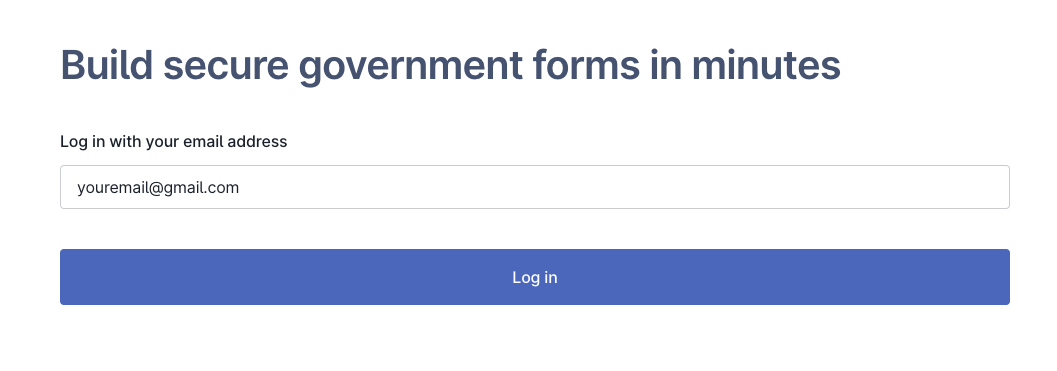
Log in with your Gmail, Yahoo, or Outlook email to start building forms immediately.

1. To start, key in your email and login via OTP.

<figure><img src="https://3225095994-files.gitbook.io/~/files/v0/b/gitbook-x-prod.appspot.com/o/spaces%2FFiAVh1Ff3KUiYxMAZuJG%2Fuploads%2FrhvR9ULPJ1Cd6FfxVoik%2Fimage.png?alt=media&amp;token=8b883e58-2057-4d6e-a8b0-d8af8627d436" alt=""><figcaption></figcaption></figure>

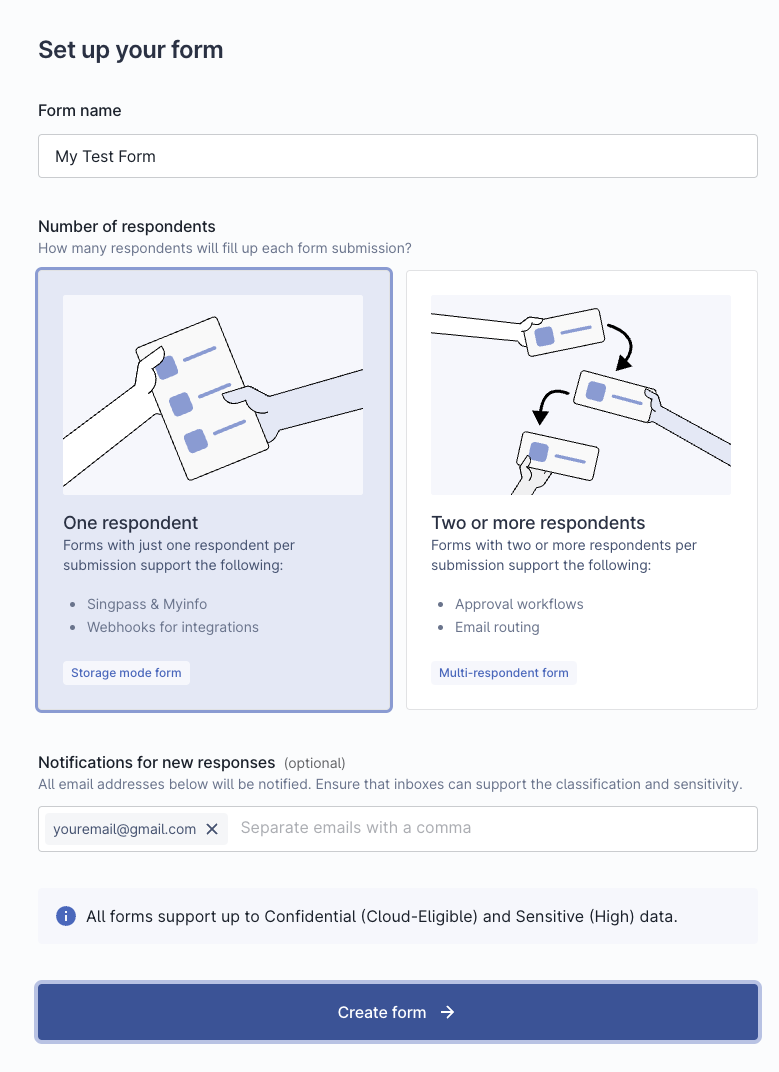
2. Create the form of your choosing

<figure><img src="https://3225095994-files.gitbook.io/~/files/v0/b/gitbook-x-prod.appspot.com/o/spaces%2FFiAVh1Ff3KUiYxMAZuJG%2Fuploads%2Fe8i54ZseE8XBAfEnuDEy%2Fimage.png?alt=media&amp;token=ad595e72-7691-4912-9be6-c70023ad21c9" alt=""><figcaption></figcaption></figure>

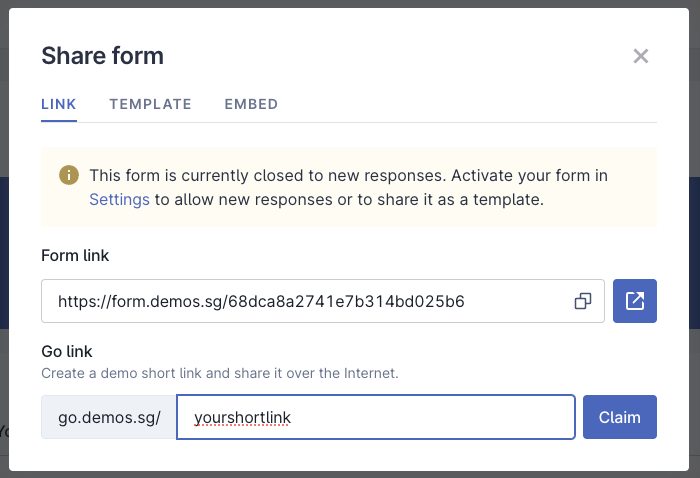
3. After editing your form, you can make it public and share the link, OR use it in tandem with the Go demo (link shortener)!

<figure><img src="https://3225095994-files.gitbook.io/~/files/v0/b/gitbook-x-prod.appspot.com/o/spaces%2FFiAVh1Ff3KUiYxMAZuJG%2Fuploads%2FcrEXtvX50RK80HWgXFPT%2Fimage.png?alt=media&amp;token=fd7609f4-c549-4702-970f-391537f4f56c" alt=""><figcaption></figcaption></figure>

### What You Can Do

Explore FormSG's full feature set in this demo environment:

* **Build forms** with drag-and-drop ease using 20+ field types
* **Add logic** to show or hide fields based on user responses
* **Test workflows** including form submission and response collection
* **Try features** like email notifications, and downloading responses
* **Experience the admin dashboard** for managing forms and viewing responses
* **Create public forms**

### Demo Limitations

{% hint style="warning" %}
**Important: This is a demo environment**

Please note these limitations to keep the demo safe and available for everyone:

* **Login**: Use Gmail, Yahoo, or Outlook emails (not government email domains)
* **Data resets every 3 hours**: All forms and responses are automatically deleted to prevent misuse
* **No personal data**: Do not submit real personal information, sensitive data, or confidential content
* **Demo watermarks**: The demo includes clear indicators that distinguish it from production FormSG instances
* **Testing only**: This environment is for evaluation purposes, not for collecting real responses
  {% endhint %}

### Ready to Deploy?

Once you've explored the demo, you can deploy FormSG in your own infrastructure to:

* Keep full control of your data with complete data sovereignty
* Remove all limitations and customise to your needs
* Use your own authentication systems and email domains
* Scale to handle production workloads

Want to get started with deployment in your environment? Check out our self-hosting guide:

{% content-ref url="/pages/iQ2ulR3yTpZMIoPwSSse" %}
[FormSG](/self-hosting/formsg)
{% endcontent-ref %}

### Learn More

* [**form.gov.sg**](https://form.gov.sg) - See FormSG in production use by the Singapore government
* [**guide.form.gov.sg**](https://guide.form.gov.sg/) - Complete feature documentation and user guides
* <https://github.com/opengovsg/FormSG> - The open source codebase


# GoGovSG

GoGovSG is a link shortener built for government communications. Create memorable short links and QR codes for campaigns, posters, forms, and digital outreach - making it easy for citizens to access government services.

### Try It Yourself

**🚀** [**Launch GoGovSG Demo**](https://go.demos.sg)

Log in with your Gmail, Yahoo, or Outlook email to start creating short links immediately.

### What You Can Do

Explore GoGovSG's link management features in this demo environment:

* **Create short links** with custom, memorable aliases
* **Generate QR codes** automatically for any short link
* **Manage your links** with an intuitive dashboard
* **Track link clicks** to understand engagement (demo analytics)
* **Edit link destinations** after creation without changing the short URL
* **Organize links** for campaigns and projects

### Demo Limitations

{% hint style="warning" %}
**Important: This is a demo environment**

Please note these limitations to keep the demo safe and available for everyone:

* **Login**: Use Gmail, Yahoo, or Outlook emails (not government email domains)
* **Links reset every 3 hours**: All short links are automatically deleted to prevent misuse
* **Demo watermarks**: The demo includes clear indicators that distinguish it from production GoGovSG instances
* **No file uploads**: File upload features are disabled in the demo environment
* **Testing only**: This environment is for evaluation purposes, not for production campaigns
  {% endhint %}

### Learn More

* [**go.gov.sg**](https://go.gov.sg) - See GoGovSG in production use by the Singapore government
* <https://github.com/opengovsg/GoGovSG> - The open-source codebase
* [**guide.go.gov.sg**](https://guide.go.gov.sg) - Complete feature documentation and user guides


# Isomer

Isomer is a website builder and CMS designed for government agencies. Create and manage informational websites, service portals, and content pages with an intuitive editor - no coding or technical knowledge required.

### Try It Yourself

**🚀** [**Launch Isomer Demo**](https://isomer.demos.sg)

Log in with your Gmail, Yahoo, or Outlook email. A demo site will be generated for you automatically.

### What You Can Do

Explore Isomer Studio's content editing experience in this demo environment:

* **Experience the Studio editor** - see how easy it is to edit government websites
* **Create and edit pages** with an intuitive visual interface
* **Add content blocks** like text, images, cards, and accordions
* **Organise navigation** and site structure
* **Edit content in real-time** with instant previews
* **Try the workflow** for content creation and management

### Demo Limitations

{% hint style="warning" %}
**Important: This is a demo environment**

Please note these limitations to keep the demo safe and available for everyone:

* **Login**: Use Gmail, Yahoo, or Outlook emails (not government email domains)
* **Editor experience only**: The demo showcases the Isomer Studio editor interface
* **No site publishing**: Sites **will NOT be published** to the internet - this is for testing the editing experience only
* **Demo site auto-generated**: You'll receive a demo site when you log in to explore the editor
* **Testing only**: This environment is for evaluation purposes to see how simple content editing can be

The purpose of this demo is to show how easy it is to create and edit content without technical skills.
{% endhint %}

### Learn More

* [**isomer.gov.sg**](https://www.isomer.gov.sg) - See hundreds of Singapore government websites built with Isomer
* <https://github.com/opengovsg/isomer> - The open-source codebase
* <https://deepwiki.com/opengovsg/isomer> - AI-generated code documentation for learning how it works


# FormSG

This guide helps you deploy and maintain FormSG in your own infrastructure.

Welcome to the FormSG Self-Hosting Guide

[![FormSG logo](https://file.go.gov.sg/form-logo-background-rmved.png)](https://form.gov.sg)

**Self-host FormSG to:**

* **Maintain complete data sovereignty** within your jurisdiction
* **Meet compliance requirements** specific to your regulatory environment
* **Integrate seamlessly** with existing government systems and identity providers
* **Reduce vendor lock-in** while keeping full operational control

This guide takes you from evaluation to production deployment, with paths tailored for decision makers, developers, and IT teams.

### 🎯 Quick Start: See FormSG in Action

#### Try the Live Demo (5 minutes)

Experience FormSG's capabilities firsthand before deploying:

1. **Visit**: [form.demos.sg](https://form.demos.sg/)
2. **Sign in**: Use any Gmail, Yahoo, Hotmail or Outlook email
3. **Explore**: Create a form, test conditional logic, try file uploads
4. **Share**: Generate a link to demonstrate functionality to your team

{% hint style="warning" %}
**Demo environment**: Forms expire after 3 hours. Payment and webhook features are disabled. This environment is designed for evaluation and proof-of-concept demonstrations.
{% endhint %}

#### 📚 Additional Resources

* **This GitBook** - Complete, currently developed, self-hosting guide
* [**GitHub Repository**](https://github.com/opengovsg/FormSG) - Source code, issues, discussions

### 🚀 What is FormSG?

<figure><img src="https://3225095994-files.gitbook.io/~/files/v0/b/gitbook-x-prod.appspot.com/o/spaces%2FFiAVh1Ff3KUiYxMAZuJG%2Fuploads%2Fj1Yit0028IqQKYufcLu9%2FLanding-page-animation-1-%5Bcopy%5D.gif?alt=media&amp;token=68f4cd96-b84f-4b86-af84-68f3a18dddc5" alt=""><figcaption></figcaption></figure>

FormSG is a **self-service, easy-to-use and feature-rich form builder** that enables public officers to collect citizen data quickly and securely.

#### Proven at Scale

* **200+ million** paper form submissions replaced
* **160+** public agencies actively using FormSG
* **150,000+** public officers as active users
* **Since 2017** - Battle-tested in production for over 7 years

FormSG handles everything from simple contact forms to complex multi-step applications with conditional logic, file uploads, and payment processing.

{% hint style="info" %}
This is the **self-hosting deployment guide**. For guides on creating, managing, and using forms, visit the user guide: <https://guide.form.gov.sg/>
{% endhint %}

## :anchor: Choose Your Starting Point

This guide assumes your team has experience with:

* Basic Linux server administration
* Docker or container orchestration
* Managing environment variables and secrets
* Working with Node.js applications

{% hint style="success" %}
While technical knowledge is helpful, don't let it stop you from getting started!
{% endhint %}

<table data-view="cards"><thead><tr><th></th><th></th><th data-type="content-ref"></th><th></th><th></th><th data-hidden data-card-target data-type="content-ref"></th></tr></thead><tbody><tr><td>🎯 Decision Maker</td><td><em>"Should my organisation adopt FormSG?"</em></td><td><a href="/self-hosting/formsg/evaluation-guide">Evaluation Guide</a></td><td>Cost-benefit analysis, risk assessment, and technical feasibility frameworks for go/no-go decisions.</td><td><strong>📖 15 min read</strong></td><td></td></tr><tr><td>👨‍💻 Developer</td><td><em>"I want to try FormSG locally first"</em></td><td><a href="/self-hosting/formsg/quickstart">Quickstart</a></td><td>Get a local development environment running in 30 minutes to test FormSG's capabilities and understand the architecture hands-on.</td><td><strong>📖 10 min read + 30 min setup</strong></td><td></td></tr><tr><td>🏗️ Mature Team</td><td><em>"We want to deploy to production"</em></td><td><a href="/self-hosting/formsg/deployment">Deployment</a></td><td>Complete AWS deployment with security, monitoring, and validation.</td><td><strong>📖 45 min read</strong></td><td></td></tr><tr><td><span data-gb-custom-inline data-tag="emoji" data-code="2601">☁️</span> Alternative Cloud</td><td><em>"AWS may not be for us"</em></td><td><a href="/self-hosting/formsg/infrastructure-guidance">Infrastructure Guidance</a></td><td>Deploy to non-AWS cloud providers or on-premises infrastructure.</td><td><strong>📖 20 min read</strong></td><td></td></tr><tr><td>🔧 Platform Engineering Team</td><td><em>"We need to integrate with existing systems"</em></td><td><a href="/self-hosting/formsg/component-customization">Component Customization</a></td><td>Replace email, storage, identity providers, and other components with your organisation's alternatives.</td><td><strong>📖 25 min read</strong></td><td></td></tr><tr><td><span data-gb-custom-inline data-tag="emoji" data-code="2696">⚖️</span> Compliance Officer</td><td><em>"What are our legal obligations?"</em></td><td><a href="/self-hosting/formsg/legal-and-compliance">Legal and Compliance</a></td><td>Legal and compliance requirements you must follow when forking FormSG.</td><td><strong>📖 10 min read</strong></td><td></td></tr></tbody></table>


# Evaluation Guide

This guide helps government IT teams and decision makers evaluate whether FormSG is the right forms solution for your organization.

### Proven Success at Scale

FormSG has processed **200+ million government form submissions** across **160+ agencies** in Singapore since 2017.

#### International Adoptions

Government teams worldwide have successfully forked and deployed FormSG for their local contexts:

* 🇱🇰 **Sri Lanka** - [FormLK](https://forms.gov.lk/)
* 🇰🇭 **Cambodia** - [FormKH](https://form.gov.kh/)
* 🇻🇳 **Vietnam** - [FormVN](https://form.gov.vn/)

These implementations demonstrate FormSG's adaptability across different government contexts and technical environments.

[View detailed metrics and reports →](https://reports.open.gov.sg/formsg/overview)

### Why Self-Host FormSG?

#### Core Benefits

* **Data Sovereignty**: Keep citizen data within your jurisdiction
* **No Vendor Lock-in**: Modify and extend without vendor negotiations
* **Unlimited Scaling**: No per-form or per-submission fees
* **Full Customization**: Integrate with any government system
* **Cost Control**: Eliminate recurring license fees

### Understanding What You're Evaluating

Before deciding whether FormSG fits your needs, understand its architecture and dependencies:

<figure><img src="https://3225095994-files.gitbook.io/~/files/v0/b/gitbook-x-prod.appspot.com/o/spaces%2FFiAVh1Ff3KUiYxMAZuJG%2Fuploads%2FsCNmoCABlx9kYtFUc3UG%2Fimage.png?alt=media&amp;token=d9ebf561-8a54-44c9-b2df-bfa7e6fae50c" alt=""><figcaption></figcaption></figure>

The colour coding shows which components are easier (🟢) or harder (🔴) to replace with your preferred alternatives.

### Is FormSG Right for Your Organization?

<details>

<summary>✅ <strong>Good fit if you have</strong></summary>

* High form volume (100+ forms or 1000+ submissions monthly)
* Data sovereignty requirements
* Technical team or ability to hire contractors
* Current form solution costing >$50k/year
* Need for customization and integration

</details>

<details>

<summary>❌ <strong>May not fit if you need</strong></summary>

* Vendor support with SLAs
* Immediate deployment (<1 month)
* Solution for <10 forms total
* No technical capabilities available
* Turnkey solution with zero maintenance

</details>

### Technical Requirements

#### Skills Your Team Needs

Your team should collectively have experience with:

* Linux server administration
* Docker/container orchestration
* Environment variables and secrets management
* Node.js applications
* Basic web application security

{% hint style="success" %}
**Team size flexibility**: These skills can be distributed across your team. A single full-stack developer can learn what's needed, or you can split responsibilities across specialists.&#x20;

Many teams successfully learn as they implement.
{% endhint %}

#### Cost-Benefit Considerations

**Initial Investment:**

* **Setup effort**: Varies by deployment type (see options below)
* **Infrastructure costs**: Scale with usage, redundancy, and security needs
* **Timeline**: From days for proof-of-concept to months for production

**Ongoing Investment:**

* **Regular maintenance**: Updates, monitoring, and support
* **Infrastructure costs**: Monthly cloud/hosting expenses
* **Team allocation**: Depends on scale and customization needs

**Typical Benefits:**

* **Eliminate licensing fees**: No per-form or per-submission charges
* **Avoid vendor lock-in**: No contract negotiations or surprise price increases
* **Full control**: Customise features and integrations as needed
* **Data sovereignty**: Complete ownership of citizen data within your infrastructure
* **Unlimited scaling**: Add forms and users without additional licensing

{% hint style="info" %}
**Cost comparison tip**: Calculate your current annual spend on form solutions (licenses, support, customisation fees) to assess potential savings.&#x20;
{% endhint %}

#### Deployment Options Overview

|                                 |                                                                                                                                                                                                                                                                      |
| ------------------------------- | -------------------------------------------------------------------------------------------------------------------------------------------------------------------------------------------------------------------------------------------------------------------- |
| **Container Deployment on VMs** | <ul><li><strong>Effort</strong>: Low</li><li><strong>Timeline</strong>: A few days</li><li><strong>Customisation</strong>: Minimal (environment variables only)</li><li><strong>Best for</strong>: Pilot projects, proof-of-concept, small team evaluation</li></ul> |
| **Standard AWS Deployment**     | <ul><li><strong>Effort</strong>: Low-Medium</li><li><strong>Timeline</strong>: 1-2 weeks</li><li><strong>Customisation</strong>: Minimal required</li><li><strong>Best for</strong>: Teams wanting to get started quickly</li></ul>                                  |
| **Multi-Cloud Deployment**      | <ul><li><strong>Effort</strong>: Medium-High</li><li><strong>Timeline</strong>: 2-4 weeks</li><li><strong>Customisation</strong>: Component replacement required</li><li><strong>Best for</strong>: Teams with existing cloud investments</li></ul>                  |
| **On-Premises Deployment**      | <ul><li><strong>Effort</strong>: High</li><li><strong>Timeline</strong>: 4-8 weeks</li><li><strong>Customisation</strong>: Extensive infrastructure work</li><li><strong>Best for</strong>: Air-gapped or highly regulated environments</li></ul>                    |
| **Hybrid Government Cloud**     | <ul><li><strong>Effort</strong>: Medium-High</li><li><strong>Timeline</strong>: 6-10 weeks</li><li><strong>Customisation</strong>: Government-specific integrations</li><li><strong>Best for</strong>: Teams with existing government cloud infrastructure</li></ul> |

#### Decision Points and Next Steps

**If Proceeding with FormSG:**

1. **Start Small**: Set up local development environment
2. **Plan Deployment**: Review basic deployment guide
3. **Identify Customisations**: Assess component customisation needs
4. **Prepare Team**: Train staff on required technologies

**If Uncertain:**

1. **Proof of Concept**: Deploy locally and test with sample forms
2. **Technical Assessment**: Review your team's capabilities against requirements
3. **Vendor Comparison**: Evaluate commercial alternatives side-by-side
4. **Pilot Project**: Start with non-critical forms to reduce risk

***

{% hint style="success" %}
**Key Takeaway**: FormSG is a powerful, flexible government forms platform that requires technical investment but provides complete control and customisation. Success depends on having the right skills, resources, and commitment to the implementation journey.
{% endhint %}


# Quickstart

This quickstart guide helps you get FormSG running locally using Docker Compose for development and testing purposes.

Get FormSG running locally in \~30 minutes using Docker Compose.

### Prerequisites

Make sure you have:

* [Docker and Docker Compose](https://docs.docker.com/get-docker/) (Docker Compose v2 recommended)
* [Node.js](https://nodejs.org/) v22.12 (specified in `.nvmrc`)
* [npm](https://www.npmjs.com/) or [pnpm](https://pnpm.io/)
* [Node Version Manager (nvm)](https://github.com/nvm-sh/nvm) - highly recommended for version management

#### Choose Your Repository

You have two repository options:

{% tabs %}
{% tab title="🏛️ Standard FormSG" %}
**FormSG** - Complete feature set (recommended)

```bash
git clone https://github.com/opengovsg/FormSG.git
cd FormSG
```

**Best for:**

* Most teams and deployments
* Always up-to-date with latest features and security patches
* Complete feature reference for customization
* Singapore government deployments
  {% endtab %}

{% tab title="🌍 International Variant" %}
**FormSG International** - Singapore-specific features removed

```bash
git clone https://github.com/opengovsg/formsg-intl.git
cd formsg-intl
```

After cloning, read the [README](https://github.com/opengovsg/formsg-intl) of the repo to patch over the `replacements` folder

**Best for:**

* International teams wanting a cleaner starting point
* Deployments that don't need Singapore-specific integrations
* Teams preferring to start without Singapore-specific code

{% hint style="warning" %}
The formsg-intl repository removes most Singapore-specific features and branding.

Note that the code implementing these features may still be present, so you are free to remove them, or study them to understand how you might build equivalent features in your local context.
{% endhint %}
{% endtab %}
{% endtabs %}

### Setup Steps

{% stepper %}
{% step %}

#### Clone the Repository

Get the FormSG source code:

```bash
git clone https://github.com/opengovsg/FormSG.git
cd FormSG
```

{% endstep %}

{% step %}

#### Install Node.js Version

Use the correct Node.js version specified in the project:

```bash
nvm install
nvm use
```

{% endstep %}

{% step %}

#### Install Dependencies

Install npm packages for frontend, backend, and virus-scanner:

```bash
npm install && npm --prefix serverless/virus-scanner install
```

{% endstep %}

{% step %}

#### Configure Environment

Copy the example environment file:

```bash
cp .env.example .env
```

{% hint style="info" %}
The `docker-compose.yml` file contains sensible defaults for local development. Your `.env` file will override these when needed.
{% endhint %}

**Mac users**: Consider increasing Docker's RAM allocation to 4GB minimum via Docker Desktop → Preferences → Resources.
{% endstep %}

{% step %}

#### Build Frontend

Build the React frontend for development:

```bash
npm run build:frontend
```

Verify the build succeeded:

```bash
ls -la dist/frontend
```

You should see the built frontend files in the `dist/frontend` directory.
{% endstep %}

{% step %}

#### Start Development Environment

Launch all services:

```bash
npm run dev
```

This command:

* Builds and runs backend services via Docker Compose
* Starts the React frontend on your host machine
* **First run takes \~10 minutes** to download and build images

Wait for all services to start completely.
{% endstep %}
{% endstepper %}

### Troubleshooting

#### Need to restart?

If you need to start over from scratch:

```bash
# Stop and remove all containers, networks, and orphaned containers
docker compose down --remove-orphans

# Optionally remove volumes (clears database data)
docker compose down --remove-orphans --volumes
```

Then restart from Step 1.

### Accessing FormSG

Once everything is running, access your local FormSG instance:

* **Frontend**: <http://localhost:5173> - Main FormSG application
* **Backend API**: <http://localhost:5001> - API server
* **Mail Server**: <http://localhost:1080> - Development email interface

{% hint style="success" %}
**✅ Success Check**: If you can access <http://localhost:5173> and see the FormSG interface, your local setup is working correctly!
{% endhint %}

#### Accessing email locally

FormSG uses [MailDev](https://github.com/maildev/maildev) for email testing in development. Access the MailDev interface at <http://localhost:1080> to:

* View all emails sent by FormSG (OTP codes, form submissions, etc.)
* Test email workflows without sending real emails
* Debug email templates and formatting

#### Login using MockPass locally

FormSG includes MockPass for simulating government authentication:

1. On the login page, click **"Login with Singpass"**
2. Select any test profile from the dropdown (e.g., `S9812379B [MyInfo]`)
3. Complete the mock authentication flow
4. You'll be logged in as a test user

{% hint style="info" %}
**For production**: Replace MockPass with your country's actual identity provider integration. See Component Customization for guidance.
{% endhint %}

#### Adding dependencies

Run `npm install` as per usual.

For backend dependencies, rebuild the containers:

```bash
docker compose up --build --renew-anon-volumes
```

This rebuilds the backend Docker image with fresh node\_modules.

As frontend project is currently not using Docker, no other steps are required.

**Environment Variable Priority**

Docker-compose looks at various places for environment variables in this order of priority:

1. Compose file
2. Shell environment variables
3. Environment file (`.env`)
4. Dockerfile

The `.env` file you created from `.env.example` will provide the default configuration for local development. For production deployments, you'll need to customize these values according to your infrastructure and security requirements.


# Deployment

Deploy FormSG using the approach that best fits your team's timeline, infrastructure, and requirements.

FormSG offers flexible deployment options to meet different organizational needs, from quick evaluation environments to enterprise-scale production systems.

### Choosing Your Approach

**Start simple, scale as needed.** Most teams begin with a basic deployment to evaluate FormSG, then move to more robust infrastructure for production use.

#### Key Considerations

* **Timeline**: How quickly do you need FormSG running?
* **Scale**: How many users and forms will you support?
* **Infrastructure**: What platforms does your organization prefer?
* **Team**: What technical capabilities do you have available?

Each deployment guide includes migration paths to help you evolve your infrastructure as requirements change. Didn't see your preferred cloud deployment here? See [Infrastructure Guidance](/self-hosting/formsg/infrastructure-guidance).

***

{% hint style="success" %}
**New to FormSG?** Start with Quickstart/VM Deployment to get hands-on experience, then choose your production platform once you've validated the solution for your needs.
{% endhint %}

**Deployed FormSG on a new platform?** We'd love to learn from your experience and help other government teams benefit from your work.

If you've successfully deployed FormSG on platforms not covered in our guides or created deployment templates, please consider contributing back:

* **Reach out directly** at <international@open.gov.sg> to discuss
* **Open a GitHub issue** to share your deployment approach
* **Submit a pull request** with your deployment templates or documentation

Your contributions help government teams worldwide deploy FormSG more effectively!


# Virtual Machine (Docker)

Deploy FormSG to a virtual machine for small-scale production use, staging environments, or pilot deployments. This guide uses Docker Compose on a single server to get FormSG running with minimal infrastructure complexity.

### Overview

This deployment is ideal for:

* **Pilot projects** - Test FormSG with real users before full production
* **Small organizations** - Up to 1,000 form submissions per month
* **Staging environments** - Test customizations and integrations
* **Air-gapped deployments** - Isolated government networks
* **Budget-conscious teams** - Simple infrastructure with predictable costs

### Prerequisites

* Cloud provider account (AWS, Azure, GCP) or physical server access
* Basic Linux command line knowledge
* SSH client on your local machine
* Domain name (optional but recommended)

### Architecture Overview

<figure><img src="https://3225095994-files.gitbook.io/~/files/v0/b/gitbook-x-prod.appspot.com/o/spaces%2FFiAVh1Ff3KUiYxMAZuJG%2Fuploads%2FsCNmoCABlx9kYtFUc3UG%2Fimage.png?alt=media&amp;token=d9ebf561-8a54-44c9-b2df-bfa7e6fae50c" alt=""><figcaption></figcaption></figure>

This VM deployment runs FormSG components on a single server using docker containers, specific services can be seen in docker config [here](https://github.com/opengovsg/FormSG/blob/develop/docker-compose.yml).

### Deployment Steps

{% stepper %}
{% step %}

#### Create Virtual Machine

**Cloud Provider Setup:**

Choose your preferred cloud provider and create a new VM instance:

* **AWS**: EC2 → Launch Instance → Ubuntu 22.04 LTS
* **Azure**: Virtual Machines → Create → Ubuntu 22.04 LTS
* **GCP**: Compute Engine → VM instances → Create → Ubuntu 22.04 LTS

**Recommended Specifications:**

* **CPU**: 2 vCPUs (minimum 1 vCPU for testing)
* **Memory**: 4 GB RAM (minimum 2 GB)
* **Storage**: Few GBs, depending on need
* **Network**: Public IP address if external access needed

**Instance Examples:**

* **AWS**: t3.small or t3.medium (t2.micro for testing)
* **Azure**: Standard\_B2s or Standard\_B1ms (Standard\_B1s for testing)
* **GCP**: e2-small or e2-medium (e2-micro for testing)

**Security Group/Firewall Rules:**

* SSH (port 22) from your IP address
* HTTP (port 80) from anywhere (if using domain)
* HTTPS (port 443) from anywhere (if using SSL)
* Custom port 5173 from anywhere (for direct access)

{% hint style="warning" %}
**Security Note**: Restrict SSH access to your IP address only. Consider using a VPN or bastion host for production deployments.
{% endhint %}
{% endstep %}

{% step %}

#### Connect to Your VM

SSH into your newly created virtual machine:

```bash
# Replace with your VM's public IP address
ssh ubuntu@YOUR_VM_IP_ADDRESS

# If using SSH key authentication (recommended)
ssh -i /path/to/your-key.pem ubuntu@YOUR_VM_IP_ADDRESS
```

**First Time Setup:**

```bash
# Update system packages
sudo apt update && sudo apt upgrade -y

# Install essential tools (adjust based on your VM setup)
sudo apt install -y curl wget git htop unzip
```

{% hint style="info" %}
**Additional tools**: Depending on your VM setup, you may want to install other utilities like `wget`, `htop`, `unzip`, `nano`, or `vim`. Install what you need for your environment.
{% endhint %}
{% endstep %}

{% step %}

#### Install Docker and Docker Compose

This deployment path requires Docker and Docker Compose to run. Install them using your preferred method:

**Option 1: Official Docker Installation (Recommended)**

Follow the official Docker installation guide for Ubuntu:

* Visit: <https://docs.docker.com/engine/install/ubuntu/>
* Ensure you install Docker Compose plugin

**Option 2: Quick Installation via Convenience Script**

```bash
# Download and run Docker's convenience script
curl -fsSL https://get.docker.com -o get-docker.sh
sudo sh get-docker.sh

# Install Docker Compose plugin
sudo apt-get update
sudo apt-get install docker-compose-plugin
```

**Option 3: Package Manager Installation**

```bash
# Install Docker from Ubuntu repositories (may be older version)
sudo apt update
sudo apt install docker.io docker-compose-v2
```

**Post-Installation Setup:**

```bash
# Add your user to docker group (avoids using sudo)
sudo usermod -aG docker $USER

# Apply group changes
newgrp docker

# Verify installation
docker --version
docker compose version
docker run hello-world
```

{% hint style="info" %}
**Note**: You may need to log out and back in for group changes to take effect. The convenience script (Option 2) is often the easiest for most usecase.
{% endhint %}
{% endstep %}

{% step %}

#### Clone FormSG Repository

Get the FormSG source code:

```bash
# Clone FormSG repository
git clone https://github.com/opengovsg/FormSG.git
cd FormSG

# Install Node.js (using NodeSource repository)
curl -fsSL https://deb.nodesource.com/setup_22.x | sudo -E bash -
sudo apt-get install -y nodejs

# Verify Node.js version
node --version  # Should show v22.x.x
```

{% endstep %}

{% step %}

#### Configure Environment

Set up FormSG configuration for your VM:

```bash
# Copy example environment file
cp .env.example .env

# Edit environment file
nano .env
```

**Essential Configuration Changes:**

Update these variables in your `.env` file:

```bash
# Email Configuration (required for OTP login)
# Option 1: Use a simple SMTP service
SES_HOST=smtp.gmail.com
SES_PORT=587
SES_USER=your-email@gmail.com
SES_PASS=your-app-password
MAIL_FROM=noreply@your-domain.com

# Option 2: Use your organization's SMTP
SES_HOST=mail.yourorg.gov
SES_PORT=587
SES_USER=formsg-service
SES_PASS=your-smtp-password
MAIL_FROM=formsg@yourorg.gov


# Database (MongoDB will run in Docker)
DB_HOST=mongodb://mongo:27017/formsg
```

{% endstep %}

{% step %}

#### Install Dependencies and Build

Install FormSG dependencies:

```bash
# Install npm packages
npm install && npm --prefix serverless/virus-scanner install

# Build frontend for production
npm run build:frontend

# Verify build completed
ls -la dist/frontend
```

This step may take 5-10 minutes depending on your VM's specs and network speed.
{% endstep %}

{% step %}

#### Start FormSG Services

You have two options for starting FormSG:

**Option 1: All-in-One (Recommended)**

```bash
# Starts both frontend and backend services (via docker) together
npm run dev
```

This handles both the frontend build and Docker services automatically.

**Option 2: Backend Only**

```bash
# Start backend services only
docker compose up -d

# Then start frontend separately (in another terminal/tmux ession)
npm run dev:frontend
```

Use this if you want more control over individual services.

**Services Starting:**

* **MongoDB**: Database server
* **MailDev**: Email testing
* **FormSG Backend**: API server
* **FormSG Frontend**: Web interface (port 5173)

{% hint style="info" %}
**Recommended**: Use `npm run dev` for simplicity. It handles everything you need for a VM deployment.
{% endhint %}
{% endstep %}
{% endstepper %}

### Accessing Your FormSG Instance

#### Web Interface

Open your browser and navigate to:

* **Main Application**: `http://YOUR_VM_IP:5173`
* **Email Testing**: `http://YOUR_VM_IP:1080` (MailDev interface)

#### First Login

1. Go to the admin portal: `http://YOUR_VM_IP:5173/login`
2. Click "Login with Email"
3. Enter your email address
4. Check the MailDev interface (`http://YOUR_VM_IP:1080`) for the OTP code
5. Enter the OTP to complete login

### Scaling

This VM deployment runs all FormSG components on a single server, which limits scaling options. For high-traffic scenarios or high availability requirements, consider moving to a cloud-native deployment with multiple servers.

#### When to Move Beyond VM Deployment

Consider migrating to a more robust deployment when you experience:

* **High traffic**: >1,000 concurrent users or >10,000 daily submissions
* **Availability requirements**: Need 99.9% uptime or zero-downtime deployments
* **Advanced integrations**: Complex workflows requiring multiple services

***

{% hint style="success" %}
**🎉 Congratulations!** You now have FormSG running on a virtual machine. This provides a solid foundation for small-scale production use while maintaining full control over your infrastructure.
{% endhint %}


# AWS

This guide helps you deploy FormSG to production using standard AWS services with minimal customisation. For teams wanting to get FormSG running quickly in an AWS environment.

### Quick Start Prerequisites

Before deploying FormSG to AWS:

* [ ] **AWS Account** with administrative access
* [ ] **Domain name** you control (e.g., forms.yourorg.gov)
* [ ] **Basic AWS knowledge** (familiarity with AWS Console)

<details>

<summary><strong>📋 Production Planning Checklist</strong></summary>

**Additional Planning for Production Deployments:**

* [ ] **SSL certificate** strategy (CDK can create automatically or use existing)
* [ ] **Estimated user load** (concurrent users, forms per day)
* [ ] **Email provider** setup (AWS SES domain verification)
* [ ] **Database strategy** (MongoDB Atlas vs self-hosted)
* [ ] **Security and compliance** requirements documented
* [ ] **Budget approved** for ongoing AWS infrastructure costs

**💰 Budget Planning:**

Government teams typically need cost estimates for approval:

* **Compute costs**: Vary by region and usage (ECS Fargate pricing)
* **Database costs**: MongoDB Atlas M10+ or self-hosted infrastructure
* **Storage & networking**: S3, data transfer, and load balancer costs

**For planning purposes**: Small government deployments (few hundred daily users) typically cost $100-400/month depending on region and configuration.

Use the [AWS Pricing Calculator](https://calculator.aws/) with your specific requirements for accurate estimates.

</details>

### FormSG Production Architecture

This guide deploys the complete FormSG architecture to AWS:

<figure><img src="https://3225095994-files.gitbook.io/~/files/v0/b/gitbook-x-prod.appspot.com/o/spaces%2FFiAVh1Ff3KUiYxMAZuJG%2Fuploads%2FsCNmoCABlx9kYtFUc3UG%2Fimage.png?alt=media&amp;token=d9ebf561-8a54-44c9-b2df-bfa7e6fae50c" alt=""><figcaption></figcaption></figure>

#### AWS Infrastructure Implementation

The FormSG components map to AWS services as follows:

* **Frontend & API**: ECS containers behind Application Load Balancer
* **Database**: MongoDB Atlas or self-hosted MongoDB on EC2
* **Object Storage**: S3 buckets with encryption
* **Email Service**: AWS SES with SMTP
* **Identity Provider**: AWS Cognito or external SAML/OIDC
* **Monitoring**: CloudWatch + optional Datadog
* **Container Platform**: ECS

### 🌟 Quick Deployment with CDK Template

**Recommended Approach**: Use the official FormSG CDK template for faster path to deployment.

#### Why Use the Template?

The FormSG team provides an AWS-ready CDK template that includes:

* **Infrastructure** - VPC, ECS, S3, ALB, CloudWatch, and monitoring
* **Security configurations** - Network isolation, encryption, and access controls
* **Automated SSL** - Certificate management and renewal
* **Cost optimized** - Right-sized resources for typical government workloads

#### Getting Started

{% tabs %}
{% tab title="Quick Start" %}
**Repository**: [opengovsg/formsg-on-cdk](https://github.com/opengovsg/formsg-on-cdk)

```bash
# 1. Clone the official template
git clone https://github.com/opengovsg/formsg-on-cdk.git
cd formsg-on-cdk

# 2. Install dependencies
npm install

# 3. Deploy to AWS
npx cdk bootstrap  # First time only
npx cdk deploy
```

**Deployment time**: 15-30 minutes for complete infrastructure setup.
{% endtab %}

{% tab title="Configuration" %}
**Essential Settings** (configure after deployment):

The CDK template will prompt you for or you'll need to configure:

* **Domain name** - Your FormSG domain (e.g., forms.yourorg.gov)
* **MongoDB connection** - Atlas cluster or self-hosted database URL
* **Email settings** - AWS SES SMTP configuration for your domain
* **SSL certificate** - CDK can create this automatically or use existing

**What to prepare**:

* Domain name you control
* MongoDB Atlas cluster (recommended) or self-hosted MongoDB
* AWS SES domain verification for email delivery

Refer to the [CDK template documentation](https://github.com/opengovsg/formsg-on-cdk/wiki) for specific configuration steps.
{% endtab %}

{% tab title="Post-Deployment" %}
**After deployment completes**:

1. **Verify deployment**: Check the CDK outputs for your application URL
2. **Test login**: Visit admin portal and test email OTP delivery
3. **Configure DNS**: Point your domain to the provided load balancer
4. **Set up monitoring**: Review CloudWatch dashboards created automatically

**CDK Outputs** include:

* Application Load Balancer DNS name
* ECS cluster name
* S3 bucket names
* CloudWatch log groups
  {% endtab %}
  {% endtabs %}

#### CDK Template Documentation

For detailed configuration options, troubleshooting, and advanced features:

* **Project Wiki**: [CDK Template Documentation](https://github.com/opengovsg/formsg-on-cdk/wiki)
* **Issues & Support**: [GitHub Issues](https://github.com/opengovsg/formsg-on-cdk/issues)

{% hint style="success" %}
**Fastest Path**: The CDK template provides the quickest way to get FormSG running on AWS with tested configurations.
{% endhint %}

### Can't Use the CDK Template?

The CDK template above is the publicly available approach for AWS deployment. However, if you have specific constraints:

#### Alternative Approaches

{% tabs %}
{% tab title="Other IaC Tools" %}
**If your organization requires different Infrastructure as Code:**

**Terraform/Pulumi/CloudFormation** (2-4 weeks additional effort):

* Start with `cdk synth` to see the generated CloudFormation resources
* Adapt the resource definitions to your preferred tool
* See Infrastructure Guidance for architectural patterns

{% hint style="warning" %}
These approaches require significant additional work and technical expertise.
{% endhint %}
{% endtab %}

{% tab title="Non-AWS Deployment" %}
**If you can't use AWS:**

* **Other cloud providers**: See Infrastructure Guidance for multi-cloud patterns
* **Smaller scale**: Consider VM Deployment for simpler infrastructure needs
* **Hybrid approach**: Start with VM deployment, migrate to cloud when ready

{% hint style="info" %}
FormSG's architecture is cloud-agnostic but requires adaptation work for non-AWS platforms.
{% endhint %}
{% endtab %}

{% tab title="Learning & Understanding" %}
**If you want to understand the infrastructure:**

* Review the "Understanding What Gets Created" section below
* Check Infrastructure Guidance for detailed architectural patterns
* Consider VM Deployment for hands-on learning with simpler setup
* 2Use AWS Console (ClickOps) to manually + explore the components created by CDK

{% hint style="success" %}
**Recommended learning path**: Start with VM deployment to understand FormSG, then move to CDK template for production.
{% endhint %}
{% endtab %}
{% endtabs %}

### Understanding What Gets Created

The CDK template automatically sets up a complete FormSG infrastructure including:

* **Networking**: VPC with public/private subnets, load balancer, security groups
* **Compute**: ECS cluster with auto-scaling containers
* **Storage**: S3 buckets for files, Parameter Store for configuration
* **Database**: Connection to your MongoDB (Atlas or self-hosted)
* **Email**: Integration with AWS SES for notifications
* **Monitoring**: CloudWatch logs, metrics, and basic alarms
* **Security**: SSL certificates, encryption, network isolation

#### Architecture Details

{% tabs %}
{% tab title="Network" %}

* VPC with public and private subnets
* Application Load Balancer in public subnets (internet-facing)
* ECS containers in private subnets (internal only)
* Security groups with least-privilege access (ALB → ECS → Database)
  {% endtab %}

{% tab title="Application" %}

* ECS cluster with Fargate for serverless container management
* Auto-scaling group (2-10 containers based on CPU/memory)
* Application Load Balancer with SSL termination and health checks
* ECR repository for FormSG container images
  {% endtab %}

{% tab title="Data" %}

* MongoDB Atlas integration (recommended) or self-hosted MongoDB
* S3 buckets for form attachments, images, and static assets
* AWS Parameter Store for environment variables
* AWS Secrets Manager for sensitive credentials (database passwords, API keys)
  {% endtab %}

{% tab title="External Services" %}

* AWS SES for email delivery with DKIM/SPF configuration
* Route 53 or external DNS for domain management
* AWS Certificate Manager for SSL certificate automation
* CloudWatch for logging, metrics, alarms, and cost monitoring
  {% endtab %}
  {% endtabs %}

This architecture provides high availability, security, and scalability suitable for government production workloads.

### Validation Checklist

1. **Check CDK outputs** for your application URL
2. **Visit your FormSG domain** and proceed with functional testing:

* [ ] Login with email OTP
* [ ] Create and publish a test form
* [ ] Submit form as citizen user

**Issues?** Check CloudWatch logs for your ECS service. Common problems: MongoDB connection, SES verification, DNS configuration.

### Next Steps

{% hint style="success" %}
**🎉 Success!** Your FormSG production deployment is now running on AWS.

**Recommended next steps**:

* Set up automated backups for your database
* Review security settings and compliance requirements
  {% endhint %}


# Fly.io

Explore FormSG running on Fly.io platform through a live demo and learn about platform adaptation patterns.

### Quick Start Prerequisites

Before exploring FormSG on Fly.io:

* [ ] **Fly.io account** with CLI installed (optional - for your own deployment)
* [ ] **Basic Docker knowledge** (helpful for understanding the setup)

### FormSG Demo Architecture

This demo shows how FormSG can be adapted for the Fly.io platform:

#### Fly.io Implementation

FormSG components in this demo setup:

* **Application**: Single container running on Fly.io infrastructure
* **Database**: External MongoDB instance
* **Object Storage**: External storage service
* **Email Service**: External SMTP provider
* **Monitoring**: Basic Fly.io platform monitoring

### 🌟 Live FormSG Demo

**Try it now**: [form.demos.sg](https://form.demos.sg) - A working FormSG instance you can explore immediately

#### What the Demo Demonstrates

The FormSG Fly.io demo showcases:

* **Platform deployment** - FormSG running on Fly.io infrastructure
* **Overlay architecture** - How to customize FormSG for different contexts
* **Platform adaptation** - FormSG adapted for container deployment
* **Development workflow** - Clean development and deployment patterns
* **Live example** - Working system you can test and explore

#### Getting Started

{% tabs %}
{% tab title="Quick Start" %}
**Repository**: [opengovsg/formsg-on-fly](https://github.com/opengovsg/formsg-on-fly)

```bash
# 1. Clone the template
git clone https://github.com/opengovsg/formsg-on-fly.git
cd formsg-on-fly

# 2. Install dependencies
# Install "just" command runner (macOS)
brew install just

# Or install "just" (other platforms)
# See: https://github.com/casey/just#installation

# 3. Set up the environment
just setup

# 4. Start development server
just start
```

**Local testing**: Application runs at `http://localhost:5000`
{% endtab %}

{% tab title="Configuration" %}
**Essential Settings** (configure in your Fly.io app):

**External Services** (required):

* **MongoDB**: Atlas cluster or external MongoDB instance
* **Object Storage**: Cloudflare R2, AWS S3, or compatible service
* **Email SMTP**: For OTP delivery and notifications

**Environment Variables** (set via `fly secrets`):

* Database connection string
* Storage service credentials
* SMTP configuration
* Application domain settings

**Fly.io App Setup**:

```bash
# Create Fly.io app
fly apps create your-formsg-app

# Set secrets
fly secrets set DB_HOST="mongodb+srv://..."
fly secrets set SES_USER="smtp-username"
...
```

{% endtab %}

{% tab title="Deployment" %}
**Deploy to Fly.io**:

```bash
# Deploy your configured app
fly deploy

# Check deployment status
fly status

# View application logs
fly logs
```

**Post-Deployment**:

1. **Verify deployment**: Check `fly status` for healthy instances
2. **Test application**: Visit your Fly.io app URL
3. **Configure domain**: Point your domain to Fly.io app
4. **Test functionality**: Login, create forms, test submissions

**Scaling Configuration**:

* Fly.io automatically scales based on traffic
* Configure regions via `fly.toml` for global distribution
* Monitor usage via Fly.io dashboard
  {% endtab %}
  {% endtabs %}

#### Fly.io Template Documentation

For detailed configuration and advanced features:

* **Repository**: [FormSG on Fly.io](https://github.com/opengovsg/formsg-on-fly)
* **Live Demo**: [form.demos.sg](https://form.demos.sg)
* **Fly.io Docs**: [Platform Documentation](https://fly.io/docs/)

{% hint style="success" %}
**Best For**: Learning FormSG capabilities, understanding platform adaptation patterns, or experimenting with your own FormSG instance.
{% endhint %}

### Exploring the Demo

**Try the live demo first**: Visit [form.demos.sg](https://form.demos.sg) to explore FormSG features

**If deploying your own instance**:

1. **Check deployment**: `fly status` shows healthy instances
2. **Test functionality**:
   * [ ] Login with email OTP
   * [ ] Create a test form
   * [ ] Submit form as user

**Issues?** Check `fly logs` for application logs.

{% hint style="success" %}
**🎉 Success!** You've explored FormSG on Fly.io and understand how it can be adapted for different platforms.

**Next steps**:

* Try the live demo at [form.demos.sg](https://form.demos.sg)
* Explore the overlay architecture in the repository
* Consider how this approach might work for your deployment needs
  {% endhint %}


# Golden Images

(WIP) Deploy FormSG using pre-built virtual machine images for rapid, consistent deployments across environments.

### Overview

Golden image deployment provides pre-configured virtual machine images with FormSG already installed. This approach offers the fastest path from procurement to production while ensuring consistent deployments.

### Why Golden Images

* **Speed**: Boot a VM and have FormSG running in minutes instead of hours
* **Consistency**: Identical configuration across all your deployments
* **Air-gapped friendly**: Single image file works in isolated networks
* **Reduced setup**: Pre-configured components eliminate manual setup steps

### What's Included

Golden images will provide a complete, ready-to-run FormSG environment:

* **Operating System**: Ubuntu LTS with FormSG dependencies
* **FormSG Stack**: Application and MongoDB pre-installed
* **Basic Operations**: Monitoring, logging, and update mechanisms configured

### Exploring Deployment Options

We're investigating which deployment formats would provide the most value, potentially including cloud images (AWS AMI) and virtualization templates (VMware OVA).

### Customization vs Convenience

Golden images provide a **generic FormSG configuration** optimized for rapid evaluation and standard deployments. For organizations requiring customizations (identity providers, branding, workflow changes), see our source deployment guides.

### Current Status

{% hint style="warning" %}
🚧 Under Construction
{% endhint %}

Golden image deployment is currently in exploratory development. We're investigating the feasibility and requirements for pre-built FormSG images.


# Infrastructure Guidance

This document provides proven deployment patterns from FormSG production experience, simplified for government teams to adapt to their specific environments.

### FormSG Architecture Reference

Understanding FormSG's complete architecture helps you plan which components to migrate and which to replace:

<figure><img src="https://3225095994-files.gitbook.io/~/files/v0/b/gitbook-x-prod.appspot.com/o/spaces%2FFiAVh1Ff3KUiYxMAZuJG%2Fuploads%2FsCNmoCABlx9kYtFUc3UG%2Fimage.png?alt=media&amp;token=d9ebf561-8a54-44c9-b2df-bfa7e6fae50c" alt=""><figcaption></figcaption></figure>

### When to Use This Guide

Use the guides at [Deployment](/self-hosting/formsg/deployment) wherever possible, this guide covers

* Other cloud deployment not covered like GCP, Azure, or other cloud environment
* On-premise deployment
* Understanding FormSG architecture for platform adaptation

### What This Guide Covers

1. **Infrastructure Patterns** - What FormSG needs from your platform
2. **Migration Approach** - How to implement it step by step
3. **Getting Started** - Next steps for your deployment

### Platform Context

FormSG was architected for AWS and that's where we have production experience. While the architecture is cloud-agnostic in theory, we haven't tested other cloud deployments.

{% hint style="info" %}
**What We Know**

✅ The architecture uses standard patterns (containers, MongoDB, S3-compatible storage)\
✅ Other governments have likely deployed on different clouds\
📋 This guide provides architectural patterns for adaptation to your platform
{% endhint %}

### Infrastructure Patterns

This section covers FormSG's infrastructure requirements in a cloud-agnostic way that you can adapt to your specific tools and environments.

#### Core Deployment Patterns

{% tabs %}
{% tab title="Container Service" %}
**What it does**: Runs FormSG application with auto-scaling and health monitoring

**Requirements**:

* **Container image**: Build from FormSG source or use your registry
* **Port**: 5000 (internal application port)
* **Health check**: `/api/v3/admin/forms` endpoint
* **Auto-scaling**: 2-10 instances based on CPU utilization (70% threshold)
* **Environment variables**: NODE\_ENV, DB\_HOST, SESSION\_SECRET
* **Load balancer**: For high availability and traffic distribution

**Adapt for your environment**:

* Adjust scaling parameters based on expected load
* Configure environment variables in your secrets management system
  {% endtab %}

{% tab title="Storage & Database" %}
**What it does**: Provides secure, scalable storage for forms, attachments, and application data

**Database (MongoDB-compatible)**:

* Features needed: transactions, TTL indexes, aggregation pipelines
* Connection: Standard MongoDB connection string
* Backup and disaster recovery procedures

**Object Storage (S3-compatible)**:

* Three buckets: attachments, images, static assets
* Features needed: presigned URLs, lifecycle policies, server-side encryption
* API compatibility with AWS S3

**Session Storage**:

* Redis-compatible or database-backed sessions
* 24-hour TTL for user sessions
* Encryption at rest and in transit

**Adapt for your environment**:

* Choose managed database service vs. self-hosted based on your policies
* Set up backup procedures according to your retention requirements
* Implement encryption standards required by your compliance framework
  {% endtab %}

{% tab title="Load Balancing & Network" %}
**What it does**: Securely exposes FormSG to users while protecting backend services

**Load Balancer**:

* HTTPS listener on port 443 with SSL certificate
* HTTP to HTTPS redirect on port 80
* Health checks to application containers
* DDoS protection and rate limiting

**Network Security**:

* Public subnets: Load balancer only
* Private subnets: Application containers and database
* Security rules: Load balancer → App (port 5000), App → Database (port 27017)
* Web Application Firewall (WAF) for additional security

**SSL/TLS**:

* Government-approved SSL certificates
* TLS termination at load balancer
* Encrypted traffic between all components

**Adapt for your environment**:

* Configure WAF rules based on your security requirements
* Adjust network segmentation for your compliance needs
  {% endtab %}

{% tab title="Monitoring & Logging" %}
**What it does**: Provides visibility into application performance, security events, and operational health

**Infrastructure Metrics**:

* Container CPU and memory usage
* Application response time and error rates
* Database connection counts and performance
* Failed authentication attempts

**Alerting Thresholds**:

* High CPU and memory usage
* High error rates and failed health checks
* Database connectivity issues

**Log Collection**:

* Application logs (errors, warnings, info)
* Access logs (user requests and responses)
* Security events (login attempts, permission changes)
* Audit trail (admin actions, form modifications)

**Adapt for your environment**:

* Set up log retention according to your compliance requirements
* Implement audit logging as required by your security policies
  {% endtab %}

{% tab title="Serverless Functions" %}
**What it does**: Provides on-demand virus scanning for file uploads and other serverless processing tasks

**Requirements**:

* **Function runtime**: Node.js-compatible serverless platform
* **Memory allocation**: 512MB minimum for virus scanning operations
* **Triggers**: S3 upload events
* **Dependencies**: ClamAV or equivalent virus scanning engine
* **Network access**: Download virus definitions and communicate with object storage

**File Processing**:

* Virus scanning for form attachments

**Adapt for your environment**:

* Choose managed functions (Azure Functions, Google Cloud Functions) or container-based serverless
* Configure appropriate memory and timeout limits for your file sizes
* Set up virus definition updates according to your security policies
  {% endtab %}
  {% endtabs %}

### Migration Approach

FormSG uses standard technologies (Docker, MongoDB, S3-compatible storage, SMTP) that exist on all major clouds:

* AWS ECS → Any container service
* AWS S3 → Any object storage with S3 API
* MongoDB Atlas → Any MongoDB-compatible database
* AWS SES → Any SMTP service

#### Migration Phases and Validation

{% stepper %}
{% step %}
**Phase 1: Infrastructure Foundation**

**Objective**: Establish core infrastructure components

**Activities**:

* Set up container orchestration platform
* Deploy object storage solution
* Configure networking and load balancing
* Establish monitoring and logging

**Validation**:

* [ ] Container platform can run Docker images
* [ ] Object storage passes S3 compatibility tests
* [ ] Load balancer routes traffic correctly
* [ ] Basic monitoring collects metrics
  {% endstep %}

{% step %}
**Phase 2: Data Services**

**Objective**: Migrate database and configure data persistence

**Activities**:

* Deploy MongoDB-compatible database
* Configure connection strings and authentication
* Set up backup and disaster recovery
* Test data migration procedures

**Validation**:

* [ ] Database accepts MongoDB connections
* [ ] Application can read/write form data
* [ ] Backup and restore procedures work
* [ ] Performance meets requirements
  {% endstep %}

{% step %}
**Phase 3: Application Services**

**Objective**: Configure external service integrations

**Activities**:

* Configure email service integration
* Set up SMS service (if required)
* Configure identity provider integration
* Test all communication channels

**Validation**:

* [ ] Admin login OTPs delivered via email
* [ ] Form submissions trigger notifications
* [ ] Identity authentication works
* [ ] All integrations handle errors gracefully
  {% endstep %}

{% step %}
**Phase 4: Security and Compliance**

**Objective**: Implement security controls and validate compliance

**Activities**:

* Configure TLS/SSL certificates
* Implement access controls and secrets management
* Set up security monitoring and alerting
* Conduct security testing

**Validation**:

* [ ] All traffic encrypted in transit
* [ ] Secrets properly managed and rotated
* [ ] Access controls enforced
* [ ] Security monitoring operational
  {% endstep %}
  {% endstepper %}

{% hint style="success" %}
**💡 Success Tip**: Start with a development environment to validate each component before migrating production workloads. This approach reduces risk and helps identify integration issues early.
{% endhint %}


# Component Customization

This guide helps you **replace specific FormSG components** with your preferred alternatives while maintaining security and functionality. Perfect for teams wanting to integrate FormSG with existing infrastructure or reduce cloud provider dependencies.

### Component Architecture

FormSG's architecture is designed for government needs with security, flexibility, and compliance in mind. Understanding how components connect helps you plan which parts to customize:

<figure><img src="https://3225095994-files.gitbook.io/~/files/v0/b/gitbook-x-prod.appspot.com/o/spaces%2FFiAVh1Ff3KUiYxMAZuJG%2Fuploads%2FsCNmoCABlx9kYtFUc3UG%2Fimage.png?alt=media&amp;token=d9ebf561-8a54-44c9-b2df-bfa7e6fae50c" alt=""><figcaption></figcaption></figure>

The colour coding shows which components are easier (🟢) or harder (🔴) to replace with your preferred alternatives.

### Why Customize Components?

Teams often need to adapt FormSG for:

* **🏛️ Existing Infrastructure**: Integrate with current systems and contracts
* **🌍 Data Sovereignty**: Keep data within your jurisdiction
* **💰 Cost Optimization**: Leverage existing volume discounts
* **🔒 Compliance**: Meet specific regulatory requirements
* **🔧 Operational Consistency**: Use familiar tools and processes

### 🎯 Component Replacement Strategy

Start with easy wins to build confidence, then tackle more complex integrations:

**🟢 Easy**: Email service, file storage, analytics, spam protection

* Government alternatives: Office 365 SMTP, Azure Blob Storage, Matomo, hCaptcha

**🟡 Medium**: Database, identity provider, monitoring, SMS service

* Government alternatives: Self-hosted MongoDB, government SSO/SAML, Prometheus + Grafana, government SMS gateways

**🔴 Advanced**: Payment processing, virus scanner

* Government alternatives: Local payment gateways, enterprise antivirus APIs

{% hint style="success" %}
**💡 Procurement Tip**: Many government teams already have contracts for Office 365, Azure, or AWS GovCloud. Start by leveraging existing vendor relationships.
{% endhint %}

#### 🟢 Easy Replacements: Quick Wins

{% tabs %}
{% tab title="Email Service (SMTP)" %}
**Most common government replacement**: Use existing Office 365 or government email infrastructure.

**Office 365 Configuration:**

```bash
SES_HOST=smtp.office365.com
SES_PORT=587
SES_USER=formsg@yourorg.gov
SES_PASS=your-office365-app-password
MAIL_FROM=noreply@yourorg.gov
```

**Validation**: Test admin login OTP delivery and form submission notifications.
{% endtab %}

{% tab title="Object Storage (S3-Compatible)" %}
**Most common government replacement**: Azure Blob Storage or self-hosted MinIO.

**Azure Blob Storage:**

```bash
AWS_ENDPOINT=https://youraccount.blob.core.windows.net
AWS_ACCESS_KEY_ID=youraccount
AWS_SECRET_ACCESS_KEY=your-blob-storage-key
IMAGE_S3_BUCKET=formsg-images
ATTACHMENT_S3_BUCKET=formsg-attachments
```

**Validation**: Test file uploads in form builder and attachment handling in forms.
{% endtab %}
{% endtabs %}

***

#### 🟡 Medium Complexity: Infrastructure Services

{% tabs %}
{% tab title="Database (MongoDB Compatible)" %}
**Government options**: Self-hosted MongoDB cluster or Azure Cosmos DB with MongoDB API.

**Self-Hosted MongoDB:**

```bash
DB_HOST=mongodb://formsg-user:password@mongo1.internal:27017,mongo2.internal:27017,mongo3.internal:27017/formsg?replicaSet=rs0&authSource=admin
```

**Requirements**: Ensure transaction support, TTL indexes, and aggregation pipelines are available.
{% endtab %}

{% tab title="Identity Provider (SAML/OIDC)" %}
**Government options**: Existing SSO systems, Azure AD B2C, or Okta.

**Azure AD B2C Configuration:**

```bash
# OIDC configuration
OIDC_DISCOVERY_URL=https://yourorg.b2clogin.com/yourorg.onmicrosoft.com/v2.0/.well-known/openid_configuration?p=B2C_1_signin
OIDC_CLIENT_ID=your-application-id
OIDC_CLIENT_SECRET=your-client-secret
```

**Requirements**: Ensure SAML/OIDC compliance and user attribute mapping. Modify the Singpass Login flow.
{% endtab %}

{% tab title="Monitoring (Metrics & Logs)" %}
**Government options**: Prometheus + Grafana or existing monitoring infrastructure.

**Requirements**: Ensure application metrics and log aggregation work with your monitoring stack.
{% endtab %}
{% endtabs %}

### Component Validation Framework

For any component replacement, follow this validation approach:

1. **Functionality**: Core features work identically to original
2. **Performance**: Response times meet your requirements
3. **Security**: Audit logs and error handling maintained
4. **Integration**: Upstream/downstream systems unaffected
5. **Monitoring**: Health checks and alerting configured

***

#### 🔴 Advanced Replacements: Complex Integrations

**Understanding FormSG's File Security Architecture**

Before replacing virus scanning, understand how FormSG's current implementation protects against malicious files:

{% @mermaid/diagram content="graph TD
%% User Actions
User\[👤 User Uploads File]
Admin\[👨‍💼 Admin Downloads File]

```
%% Storage Components
Quarantine[🔒 Quarantine Storage<br/>Temporary holding]
Clean[✅ Clean Storage<br/>Verified safe files]

%% Security Pipeline
Scanner[🛡️ Malware Protection<br/>Automatic background scanning]
Tagging[🏷️ Scan Result Tags<br/>Status metadata]
Checker[🔍 Scan Checker<br/>Polls for completion]

%% Results
CleanResult[✅ File Clean<br/>Safe for access]
InfectedResult[⚠️ Threat Detected<br/>File quarantined]

%% Form Processing
FormData[📝 Form Submission<br/>Encrypted metadata stored]

%% Main Flow
User --> Quarantine
User --> FormData

%% Security Pipeline
Quarantine -.-> Scanner
Scanner --> Tagging
Tagging -.-> Quarantine

%% Result Checking
Checker --> Quarantine
Checker --> CleanResult
Checker --> InfectedResult

%% Clean File Access
CleanResult --> Clean
Clean --> Admin

%% Infected File Handling
InfectedResult --> Quarantine

%% Styling
classDef user fill:#e3f2fd,stroke:#1976d2,stroke-width:2px
classDef storage fill:#f3e5f5,stroke:#7b1fa2,stroke-width:2px
classDef security fill:#fff3e0,stroke:#f57c00,stroke-width:2px
classDef safe fill:#e8f5e8,stroke:#4caf50,stroke-width:2px
classDef danger fill:#ffebee,stroke:#f44336,stroke-width:2px
classDef process fill:#f8f9fa,stroke:#6c757d,stroke-width:2px

class User,Admin user
class Quarantine,Clean storage
class Scanner,Tagging,Checker security
class CleanResult,Clean safe
class InfectedResult danger
class FormData process" %}
```

**Current Security Implementation:**

* **Automatic scanning** - Files scanned in background without blocking submission
* **Tag-based results** - Scan results stored as file metadata tags
* **Polling mechanism** - System checks for scan completion before allowing access
* **Fail secure** - Files remain quarantined until explicitly marked clean
* **Audit trail** - All scanning results logged for compliance

When changing implementation of virus scanner, do test with **known malware samples** (EICAR test files).

**Common Replacement Approaches:**

* **Government antivirus APIs**: Integrate with existing enterprise security tools
* **Container-based scanning**: Deploy ClamAV or commercial scanners in containers
* **Cloud security services**: Use Azure Defender or AWS GuardDuty alternatives

**Implementation Pattern**: Maintain the tag-based result system and polling mechanism for compatibility.

**Understanding FormSG's Payment Reconciliation Architecture**

Before replacing payment processing, understand how FormSG ensures payment reliability:

{% @mermaid/diagram content="graph TD
%% User Actions
User\[👤 User Submits Form<br/>with Payment]
Admin\[👨‍💼 Admin Reviews<br/>Completed Submissions]

```
%% Initial Processing
Pending[📋 Pending Submission<br/>Temporary storage]
PaymentDoc[💳 Payment Document<br/>Status tracking]
Provider[💰 Payment Provider<br/>External processing]

%% Real-time Updates
Webhook[🔔 Webhook Events<br/>Status notifications]
Processor[⚙️ Event Processor<br/>Status updates]

%% Reconciliation System
Scheduler[⏰ Scheduled Reconciliation<br/>Every 30 minutes]
Verification[🔍 Status Verification<br/>Cross-check with provider]

%% Final States
Finalized[✅ Finalized Submission<br/>Payment confirmed]
Failed[❌ Failed Payment<br/>Submission rejected]
Notifications[📧 Notifications<br/>Confirmations sent]

%% Main Flow
User --> Pending
User --> PaymentDoc
PaymentDoc --> Provider

%% Real-time Updates
Provider --> Webhook
Webhook --> Processor
Processor --> PaymentDoc

%% Reconciliation Flow
Scheduler --> Verification
Verification --> PaymentDoc
Verification --> Provider

%% Final Processing
Processor --> Finalized
Processor --> Failed
Verification --> Finalized
Verification --> Failed

%% Completion
Finalized --> Admin
Finalized --> Notifications

%% Styling
classDef user fill:#e3f2fd,stroke:#1976d2,stroke-width:2px
classDef processing fill:#f3e5f5,stroke:#7b1fa2,stroke-width:2px
classDef payment fill:#fff3e0,stroke:#f57c00,stroke-width:2px
classDef reconciliation fill:#e8f5e8,stroke:#4caf50,stroke-width:2px
classDef final fill:#f8f9fa,stroke:#6c757d,stroke-width:2px
classDef success fill:#e8f5e8,stroke:#4caf50,stroke-width:2px
classDef failure fill:#ffebee,stroke:#f44336,stroke-width:2px

class User,Admin user
class Pending,PaymentDoc,Processor processing
class Provider,Webhook payment
class Scheduler,Verification reconciliation
class Notifications final
class Finalized success
class Failed failure" %}
```

**Payment Reliability Features:**

* **Dual verification** - Webhooks + scheduled reconciliation
* **Status consistency** - Automatic cross-checking with payment provider
* **Failure recovery** - Handles missed events and processing errors
* **Audit trail** - Complete payment history and reconciliation logs
* **Automatic cleanup** - Cancels stale payments and handles edge cases

**Common Replacement Approaches:**

* **Government payment systems**: Integrate with existing financial infrastructure
* **Regional payment gateways**: Use local banking integrations
* **Enterprise payment processors**: Leverage existing contracts with payment providers

**Implementation Pattern**: Maintain the dual verification system (webhooks + reconciliation) for reliability.

***

{% hint style="success" %}
**🎯 Success Metrics**: Your customisation is successful when FormSG functions identically to the original, but with your preferred infrastructure components.&#x20;

Focus on maintaining security, performance, and user experience throughout the process.
{% endhint %}


# Configuration Reference

Complete guide to all FormSG environment variables, configuration options, and deployment settings.

This is a **comprehensive reference document** containing all available FormSG configuration options, referenced from existing documentation inside the codebase.&#x20;

FormSG is designed to be highly configurable through environment variables, allowing for customization and adaptation to different deployment environments.

## Configuration Sources

FormSG configuration comes from multiple sources depending on your deployment approach:

1. The dockerfile
2. **`.env.example` file** - Complete reference of all available variables (copy to `.env` for local development)
3. **GitHub Actions Secrets** - For deployment automation
4. **AWS Systems Manager Parameter Store** - For environment-specific configuration
5. **Environment Variables** - Direct configuration in your deployment environment

{% hint style="success" %}
**💡 Quick Start**: The `.env.example` file in the FormSG repository contains all available configuration options with example values. Copy this file to `.env` and customize the values for your environment.
{% endhint %}

This document details all available configuration options, organized by category, to help you set up your FormSG instance correctly.

### Github Actions Secrets

The following repository secrets are set in Github Actions:

| Secret                  | Description                                          |
| ----------------------- | ---------------------------------------------------- |
| `AWS_ACCESS_KEY_ID`     | AWS IAM access key ID used to deploy.                |
| `AWS_SECRET_ACCESS_KEY` | AWS IAM access secret used to deploy.                |
| `AWS_DEFAULT_REGION`    | AWS region to use.                                   |
| `ECR_REPO`              | ECR Repository which stores the docker images.       |
| `BUCKET_NAME`           | S3 Bucket used to store zipped `Dockerrun.aws.json`. |

There are also environment secrets for each environment (`staging`, `staging-alt`, `release`, `uat`):

| Secret                      | Description                                                                       |
| --------------------------- | --------------------------------------------------------------------------------- |
| `APP_NAME`                  | Application name for the environment.                                             |
| `DEPLOY_ENV`                | Deployment environment on elastic beanstalk.                                      |
| `REACT_APP_FORMSG_SDK_MODE` | Determines the keys used in the formsg SDK. Set either `production` or `staging`. |

### Environment Variables

These are configured by creating groups of environment variables formatted like `.env` files in the Parameter Store of AWS Service Manager. These groups have names formatted as `<environment>-<category>`.

#### Core Features

**AWS Systems Manager**

| Variable            | Description                                                                                                                                                                         |
| ------------------- | ----------------------------------------------------------------------------------------------------------------------------------------------------------------------------------- |
| `SECRET_ENV`        | String (typically the environment type) to be used in building of AWS Secrets Manager keys in different environments.                                                               |
| `SSM_ENV_SITE_NAME` | String (the specific environment site name) to be used in building of AWS Secrets Manager keys in different environments. (`staging`, `staging-alt`, `staging-alt2`, `prod`, `uat`) |

**App Config**

| Variable            | Description                                                                                                      |
| ------------------- | ---------------------------------------------------------------------------------------------------------------- |
| `APP_NAME`          | Application name in window title; also used as an identifier for MyInfo. Defaults to `'FormSG'`.                 |
| `APP_DESC`          | Defaults to `'Form Manager for Government'`.                                                                     |
| `APP_URL`           | Defaults to `'https://form.gov.sg'`.                                                                             |
| `APP_KEYWORDS`      | Defaults to `'forms, formbuilder, nodejs'`.                                                                      |
| `APP_IMAGES`        | Defaults to `'/public/modules/core/img/og/img_metatag.png,/public/modules/core/img/og/logo-vertical-color.png'`. |
| `APP_TWITTER_IMAGE` | Path to Twitter image. Defaults to `'/public/modules/core/img/og/logo-vertical-color.png'`.                      |

**App and Database**

| Variable             | Description                                                                                                                                                                                                |
| -------------------- | ---------------------------------------------------------------------------------------------------------------------------------------------------------------------------------------------------------- |
| `DB_HOST`            | A MongoDB URI.                                                                                                                                                                                             |
| `OTP_LIFE_SPAN`      | Time in milliseconds that admin login OTP is valid for. Defaults to 900000ms or 15 minutes.                                                                                                                |
| `PORT`               | Server port. Defaults to `5000`.                                                                                                                                                                           |
| `NODE_ENV`           | [Express environment mode](https://expressjs.com/en/advanced/best-practice-performance.html#set-node_env-to-production). Defaults to `'production'`. This should always be set to a production environment |
| `SESSION_SECRET`     | Secret for `express-session` for session management. This should always be set to a secret and random value in a production environment.                                                                   |
| `SUBMISSIONS_TOP_UP` | Use this to inflate the number of submissions displayed on the landing page. Defaults to `0`.                                                                                                              |

**Banners**

These environment variables allow us to set notification banners in the application without a full redeployment of the application. Note the hierarchy of the banner content.

In addition, you can change the color of the banner by adding a type encoding in the environment variable string. The default banner type will be `info` if no encoding is provided.

The possible banner type prefixes are: `info:`, `warn:`, and `error:`. Other prefixes will not work and the invalid prefixes will be shown in the banner text.

Examples:

```
SITE_BANNER_CONTENT=info:This is an info banner. You can also add links in the text like https://example.com. There is also a dismiss button to the right of the text.
```

![Info banner
example](https://user-images.githubusercontent.com/22133008/93852946-8a867780-fce5-11ea-929f-a0ce1c6796b9.png)

```
SITE_BANNER_CONTENT=warn:This is a warning banner. You can also add links in the text like https://example.com
```

![Warning banner example](https://user-images.githubusercontent.com/22133008/93852559-cec54800-fce4-11ea-9376-9b2802e8ac62.png)

```
SITE_BANNER_CONTENT=error:This is an error banner. You can also add links in the text like https://example.com
```

![Error banner example](https://user-images.githubusercontent.com/22133008/93852689-1055f300-fce5-11ea-956d-d5966cbe86d8.png)

```
SITE_BANNER_CONTENT=hello:This is an invalid banner type, and the full text will be shown. The default banner type of `info` will used.
```

![Invalid banner default example](https://user-images.githubusercontent.com/22133008/93853306-392ab800-fce6-11ea-9891-f752bdad236e.png)

| Variable                 | Description                                                                                                                                                                                                   |
| ------------------------ | ------------------------------------------------------------------------------------------------------------------------------------------------------------------------------------------------------------- |
| `SITE_BANNER_CONTENT`    | If set, displays a banner message on both private routes that `ADMIN_BANNER_CONTENT` covers **and** public form routes that `IS_GENERAL_MAINTENANCE` covers. Overrides all other banner environment variables |
| `ADMIN_BANNER_CONTENT`   | If set, displays a banner message on private admin routes such as the form list page as well as form builder pages.                                                                                           |
| `IS_LOGIN_BANNER`        | If set, displays a banner message on the login page.                                                                                                                                                          |
| `IS_GENERAL_MAINTENANCE` | If set, displays a banner message on all forms. Overrides `IS_SP_MAINTENANCE` and `IS_CP_MAINTENANCE`.                                                                                                        |
| `MYINFO_BANNER_CONTENT`  | all public **MyInfo-enabled** forms                                                                                                                                                                           |
| `IS_SP_MAINTENANCE`      | all public **Singpass-enabled** forms                                                                                                                                                                         |
| `IS_CP_MAINTENANCE`      | all public **Corppass-enabled** forms                                                                                                                                                                         |

> Note that if more than one of the above environment variables are defined, only one environment variable will be used to display the given values.
>
> For public form routes, only one environment variable will be read in the following precedence: `SITE_BANNER_CONTENT` > `IS_GENERAL_MAINTENANCE` > `IS_SP_MAINTENANCE` > `IS_CP_MAINTENANCE`
>
> For private form routes, only one environment variable will be read in the following precendence: `SITE_BANNER_CONTENT` > `ADMIN_BANNER_CONTENT`
>
> For the login page, only one environment variable will be read in the following precendence: `SITE_BANNER_CONTENT` > `IS_LOGIN_BANNER`

**AWS services**

| Variable                         | Description                                                                                                                         |
| -------------------------------- | ----------------------------------------------------------------------------------------------------------------------------------- |
| `AWS_REGION`                     | AWS region.                                                                                                                         |
| `AWS_ACCESS_KEY_ID`              | AWS IAM access key ID used to access S3.                                                                                            |
| `AWS_SECRET_ACCESS_KEY`          | AWS IAM access secret used to access S3.                                                                                            |
| `AWS_ENDPOINT`                   | AWS S3 bucket endpoint.                                                                                                             |
| `IMAGE_S3_BUCKET`                | Name of S3 bucket for image field uploads.                                                                                          |
| `STATIC_ASSETS_S3_BUCKET`        | Name of S3 bucket for static assets.                                                                                                |
| `LOGO_S3_BUCKET`                 | Name of S3 bucket for form logo uploads.                                                                                            |
| `GUARDDUTY_QUARANTINE_S3_BUCKET` | Name of S3 bucket for quarantined files.                                                                                            |
| `GUARDDUTY_CLEAN_S3_BUCKET`      | Name of S3 bucket for clean files.                                                                                                  |
| `GUARDDUTY_LAMBDA_FUNCTION_NAME` | Name of AWS Lambda function for GuardDuty malware scanning.                                                                         |
| `ATTACHMENT_S3_BUCKET`           | Name of S3 bucket for attachment uploads on Storage Mode.                                                                           |
| `CUSTOM_CLOUDWATCH_LOG_GROUP`    | Name of CloudWatch log group to send custom logs. Use this if you want some logs to have custom settings, e.g. shorter expiry time. |

[**FormSG JavaScript SDK**](https://www.npmjs.com/package/@opengovsg/formsg-sdk)

| Variable          | Description                           |
| ----------------- | ------------------------------------- |
| `FORMSG_SDK_MODE` | The mode to instantiate the sdk with. |

**Email and Nodemailer**

| Variable              | Description                                                                                                                                                                                                          |
| --------------------- | -------------------------------------------------------------------------------------------------------------------------------------------------------------------------------------------------------------------- |
| `SES_HOST`            | SMTP hostname.                                                                                                                                                                                                       |
| `SES_PORT`            | SMTP port number.                                                                                                                                                                                                    |
| `SES_USER`            | SMTP username.                                                                                                                                                                                                       |
| `SES_PASS`            | SMTP password.                                                                                                                                                                                                       |
| `SES_MAX_MESSAGES`    | Nodemailer configuration. Connection removed and new one created when this limit is reached. This helps to keep the connection up-to-date for long-running email messaging. Defaults to `100`.                       |
| `SES_POOL`            | Connection pool to send email in parallel to the SMTP server. Defaults to `38`.                                                                                                                                      |
| `MAIL_FROM`           | Sender email address. Defaults to `'donotreply@mail.form.gov.sg'`.                                                                                                                                                   |
| `MAIL_SOCKET_TIMEOUT` | Milliseconds of inactivity to allow before killing a connection. This helps to keep the connection up-to-date for long-running email messaging. Defaults to `600000`.                                                |
| `MAIL_LOGGER`         | If set to true then logs to console. If value is not set or is false then nothing is logged.                                                                                                                         |
| `MAIL_DEBUG`          | If set to `true`, then logs SMTP traffic, otherwise logs only transaction events.                                                                                                                                    |
| `CHROMIUM_BIN`        | Filepath to chromium binary. Required for email autoreply PDF generation with Puppeteer.                                                                                                                             |
| `BOUNCE_LIFE_SPAN`    | Time in milliseconds that bounces are tracked for each form. Defaults to 86400000ms or 24 hours. Only relevant if you have set up AWS to send bounce and delivery notifications to the /emailnotifications endpoint. |

**Rate limits at specific endpoints**

The app applies per-minute, per-IP rate limits at specific API endpoints as a security measure. The limits can be specified with the following environment variables.

| Variable                   | Description                                                                                                                                      |
| -------------------------- | ------------------------------------------------------------------------------------------------------------------------------------------------ |
| `SUBMISSIONS_RATE_LIMIT`   | Per-minute, per-IP request limit for each submissions endpoint. The limit is applied separately for the email mode and encrypt mode endpoints.   |
| `SEND_AUTH_OTP_RATE_LIMIT` | Per-minute, per-IP request limit for the endpoint which requests for new login OTPs for the admin console or mobile / email field verifications. |

#### Additional Features

The app contains a number of additional features like Captcha protection. Each of these features requires specific environment variables which are detailed below.

**Google Captcha**

Forms can be protected with [recaptcha](https://www.google.com/recaptcha/about/), preventing submissions from being made by bots.

| Variable                | Description                |
| ----------------------- | -------------------------- |
| `GOOGLE_CAPTCHA`        | Google Captcha private key |
| `GOOGLE_CAPTCHA_PUBLIC` | Google Captcha public key. |

**SMS**

The Mobile Number field supports form-fillers verifying their mobile numbers via a One-Time-Pin sent to their mobile phones.

All messages are sent using [Postman](https://postman-v2.guides.gov.sg/), a government communications service developed by the Open Government Products team. This Postman service (not to be confused with the popular API client of the same name) is specifically designed for Singapore government agencies to send SMS messages to citizens and businesses. It provides campaign management, delivery tracking, and compliance with government communication standards.

Note that verifying mobile numbers also requires the environment variables for verified Emails/SMSes.

| Variable                            | Description                                                           |
| ----------------------------------- | --------------------------------------------------------------------- |
| `POSTMAN_MOP_CAMPAIGN_ID`           | Campaign ID for MOP (Member of Public) SMS                            |
| `POSTMAN_MOP_CAMPAIGN_API_KEY`      | API key for MOP campaign                                              |
| `POSTMAN_INTERNAL_CAMPAIGN_ID`      | Campaign ID for internal SMS                                          |
| `POSTMAN_INTERNAL_CAMPAIGN_API_KEY` | API key for internal campaign                                         |
| `POSTMAN_BASE_URL`                  | Base URL for Postman API (e.g., <https://test.postman.gov.sg/api/v2>) |
| `USE_MOCK_POSTMAN_SMS`              | Boolean flag for development/testing                                  |

**Singpass/Corppass and MyInfo**

Submissions can be authenticated via [Singpass](https://www.singpass.gov.sg/singpass/common/aboutus) (Singapore's Digital Identity for Citizens) and [Corppass](https://www.corppass.gov.sg/corppass/common/aboutus) (Singapore's Digital Identity for Organizations). Forms can also be pre-filled using [MyInfo](https://www.singpass.gov.sg/myinfo/intro) after a citizen has successfully authenticated using Singpass.

Note that MyInfo is currently not supported for storage mode forms and enabling Singpass/Corppass on storage mode forms also requires Singpass/Corppass for Storage Mode to be enabled.

| Variable                         | Description                                                                                                                                                                  |
| -------------------------------- | ---------------------------------------------------------------------------------------------------------------------------------------------------------------------------- |
| `SPCP_COOKIE_MAX_AGE_PRESERVED`  | Duration of Singpass JWT before expiry in milliseconds. Defaults to 30 days.                                                                                                 |
| `SINGPASS_ESRVC_ID`              | e-service ID registered with National Digital Identity office for Singpass authentication. Needed for MyInfo.                                                                |
| `SP_OIDC_NDI_DISCOVERY_ENDPOINT` | NDI's Singpass OIDC Discovery Endpoint                                                                                                                                       |
| `SP_OIDC_NDI_JWKS_ENDPOINT`      | NDI's Singpass OIDC JWKS Endpoint                                                                                                                                            |
| `SP_OIDC_RP_CLIENT_ID`           | The Relying Party's Singpass Client ID as registered with NDI                                                                                                                |
| `SP_OIDC_RP_REDIRECT_URL`        | The Relying Party's Singpass Redirect URL                                                                                                                                    |
| `SP_OIDC_RP_JWKS_PUBLIC_PATH`    | Path to the Relying Party's Public Json Web Key Set used for Singpass-related communication with NDI. This will be hosted at /sp/.well-known/jwks.json endpoint.             |
| `SP_OIDC_RP_JWKS_SECRET_PATH`    | Path to the Relying Party's Secret Json Web Key Set used for Singpass-related communication with NDI                                                                         |
| `CP_OIDC_NDI_DISCOVERY_ENDPOINT` | NDI's Corppass OIDC Discovery Endpoint                                                                                                                                       |
| `CP_OIDC_NDI_JWKS_ENDPOINT`      | NDI's Corppass OIDC JWKS Endpoint                                                                                                                                            |
| `CP_OIDC_RP_CLIENT_ID`           | The Relying Party's Corppass Client ID as registered with NDI                                                                                                                |
| `CP_OIDC_RP_REDIRECT_URL`        | The Relying Party's Corppass Redirect URL                                                                                                                                    |
| `CP_OIDC_RP_JWKS_PUBLIC_PATH`    | Path to the Relying Party's Public Json Web Key Set used for Corppass-related communication with NDI. This will be hosted at api/v3/corppass/.well-known/jwks.json endpoint. |
| `CP_OIDC_RP_JWKS_SECRET_PATH`    | Path to the Relying Party's Secret Json Web Key Set used for Corppass-related communication with NDI                                                                         |
| `MYINFO_CLIENT_CONFIG`           | Configures [MyInfoGovClient](https://github.com/opengovsg/myinfo-gov-client). Set this to either`stg` or `prod` to fetch MyInfo data from the corresponding endpoints.       |
| `MYINFO_FORMSG_KEY`              | Filepath to MyInfo private key, which is used to decrypt data and sign requests when communicating with MyInfo.                                                              |
| `MYINFO_CERT`                    | Path to MyInfo's public certificate, which is used to verify their signature.                                                                                                |
| `MYINFO_CLIENT_ID`               | Client ID registered with MyInfo.                                                                                                                                            |
| `MYINFO_CLIENT_SECRET`           | Client secret registered with MyInfo.                                                                                                                                        |
| `MYINFO_JWT_SECRET`              | Secret for signing MyInfo JWT.                                                                                                                                               |
| `IS_SP_MAINTENANCE`              | If set, displays a banner message on Singpass forms. Overrides `IS_CP_MAINTENANCE`.                                                                                          |
| `IS_CP_MAINTENANCE`              | If set, displays a banner message on Corppass forms.                                                                                                                         |

**Verified Emails/SMSes**

The Mobile Number and Email fields support form-fillers verifying their contact details via a One-Time-Pin.

Note that verified SMSes also require SMS to be enabled.

| Variable                  | Description                                                    |
| ------------------------- | -------------------------------------------------------------- |
| `VERIFICATION_SECRET_KEY` | The secret key for signing verified responses (email, mobile). |

**Webhooks and Singpass/Corppass for Storage Mode**

Form admins can configure their Storage mode forms to POST encrypted form submissions to a REST API supplied by the form creator. The [FormSG SDK](https://github.com/opengovsg/formsg-javascript-sdk) can then be used to verify the signed posted data and decrypt the encrypted submission contained within.

These environment variables also allow Storage mode forms to support authentication via Singpass or Corppass. Note that this also requires Singpass/Corppass and MyInfo to be enabled.

| Variable             | Description                                                           |
| -------------------- | --------------------------------------------------------------------- |
| `SIGNING_SECRET_KEY` | The secret key for signing verified content passed into the database. |

#### Tests

| Variable                   | Description                                                                                                                                     |
| -------------------------- | ----------------------------------------------------------------------------------------------------------------------------------------------- |
| `MONGO_BINARY_VERSION`     | Version of the Mongo binary used. Defaults to `'latest'` according to [MongoMemoryServer](https://github.com/nodkz/mongodb-memory-server) docs. |
| `PWD`                      | Path of working directory.                                                                                                                      |
| `MOCK_WEBHOOK_CONFIG_FILE` | Path of configuration file for mock webhook server                                                                                              |
| `MOCK_WEBHOOK_PORT`        | Port of mock webhook server                                                                                                                     |


# Developer Resources

This guide provides tools and workflows to help you efficiently develop, debug, and customise FormSG.

This guide provides tools and workflows to help you efficiently develop, debug, and customize FormSG.

### :map: Codebase Exploration

#### Understanding the Architecture

<table data-view="cards" data-full-width="false"><thead><tr><th></th><th></th></tr></thead><tbody><tr><td><strong>Deepwiki</strong></td><td><p><a href="https://deepwiki.com/opengovsg/FormSG"><strong>Visit Deepwiki →</strong></a></p><ul><li><strong>Best for:</strong> Quick exploration without cloning the repo</li><li><strong>How:</strong> Visit deepwiki.com, paste FormSG's GitHub URL</li><li><strong>Use cases:</strong> Understanding architecture, finding implementation details, exploring API endpoints</li></ul></td></tr><tr><td><strong>Repository Structure</strong></td><td><p><strong>Key directories to understand:</strong></p><ul><li><code>/src</code> - Backend Node.js application</li><li><code>/frontend</code> - React frontend application</li><li><code>/shared</code> - Shared TypeScript types and utilities</li><li><code>/serverless</code> - AWS Lambda functions (virus scanning, etc.)</li></ul></td></tr></tbody></table>

#### :robot: AI-Powered Code Analysis

<table data-view="cards" data-full-width="false"><thead><tr><th></th><th></th></tr></thead><tbody><tr><td><strong>Repomix</strong></td><td><p><a href="https://repomix.com/"><strong>Get Repomix →</strong></a></p><ul><li><strong>Best for:</strong> Creating codebase summaries for AI assistants</li><li><strong>How:</strong> <code>npx repomix</code> in the FormSG directory</li><li><strong>Use cases:</strong> Generating context for Claude, ChatGPT, or other LLMs when asking architecture questions</li></ul></td></tr></tbody></table>

### 💻 Development Environment

#### AI-Native Development

<table data-view="cards" data-full-width="false"><thead><tr><th></th><th></th></tr></thead><tbody><tr><td><strong>Cursor</strong></td><td><p><a href="https://cursor.com/"><strong>Download Cursor →</strong></a></p><ul><li><strong>Best for:</strong> AI-native development with full codebase awareness</li><li><strong>Setup:</strong> Open FormSG folder in Cursor, let it index the codebase</li><li><strong>Use cases:</strong> Writing new features, refactoring with context, understanding complex code flows</li></ul></td></tr><tr><td><strong>VS Code + GitHub Copilot</strong></td><td><p><a href="https://github.com/features/copilot"><strong>Get Copilot →</strong></a></p><ul><li><strong>Best for:</strong> In-line code suggestions while developing</li><li><strong>Setup:</strong> Install VS Code extension, authenticate with GitHub</li><li><strong>Use cases:</strong> Autocomplete, following existing patterns, generating boilerplate</li></ul></td></tr></tbody></table>

### 🔧 Common Development Patterns

#### FormSG Architecture Patterns

**Frontend (React + TypeScript)**

* Uses React Query for API state management
* Chakra UI for component library
* React Hook Form for form handling
* Custom hooks for business logic

**Backend (Node.js + Express)**

* Mongoose for MongoDB interactions
* Express.js with TypeScript
* Microservice architecture for specific features
* Environment-based configuration

**Key Files to Understand**

* `/src/app/routes` - API endpoint definitions
* `/frontend/src/features` - Feature-based frontend organization
* `/shared/types` - TypeScript interfaces shared between frontend/backend
* `/src/app/models` - Mongoose database schemas


# Security

FormSG-specific security guidance for government deployments.

This document focuses on **FormSG-specific security considerations** for government deployments. It assumes your organization already has security expertise and established procedures - we focus on how FormSG integrates with your existing security framework.

### FormSG Security Architecture

FormSG implements several security patterns that enable secure government deployments:

{% @mermaid/diagram content="graph TB
subgraph "🌐 External Security"
WAF\[Web Application Firewall]
LB\[Load Balancer + TLS]
end

```
subgraph "⚙️ FormSG Application"
    Frontend[React Frontend]
    API[Express API + Auth]
end

subgraph "💾 Data Layer"
    Database[(Encrypted Database)]
    Storage[(Encrypted Storage)]
end

subgraph "🔌 External Services"
    Identity[Government Identity]
    Email[Email Service]
end

subgraph "📊 Security Monitoring"
    Logs[Audit Logs]
    SIEM[SIEM Integration]
end

%% Main Flow
Internet[👥 Users] --> WAF
WAF --> LB
LB --> Frontend
Frontend --> API

%% Data Connections
API --> Database
API --> Storage

%% External Connections
API --> Identity
API --> Email

%% Monitoring
API --> Logs
Logs --> SIEM

%% Styling
classDef external fill:#e3f2fd,stroke:#1976d2,stroke-width:2px
classDef application fill:#f3e5f5,stroke:#7b1fa2,stroke-width:2px
classDef data fill:#e8f5e8,stroke:#388e3c,stroke-width:2px
classDef integration fill:#fff3e0,stroke:#f57c00,stroke-width:2px
classDef monitoring fill:#fce4ec,stroke:#c2185b,stroke-width:2px

class WAF,LB external
class Frontend,API application
class Database,Storage data
class Identity,Email integration
class Logs,SIEM monitoring" %}
```

**Data Protection Layers**

* **Encryption in Transit**: TLS for all communications
* **Encryption at Rest**: Database and file storage encryption
* **End-to-End Encryption**: Storage mode forms use client-side encryption
* **Session Security**: Secure session management with configurable timeouts

**Access Control Model**

* **Role-Based Access**: Admin vs form creator permissions
* **Form-Level Security**: Per-form access controls
* **Authentication Integration**: Pluggable identity provider support
* **Session Management**: JWT with configurable expiration

**Security-Relevant Architecture Decisions**

Understanding why FormSG was designed certain ways helps you maintain security:

| Design Decision              | Security Benefit            | Customization Impact               |
| ---------------------------- | --------------------------- | ---------------------------------- |
| **3-Tier Architecture**      | Clear security boundaries   | Maintain network segmentation      |
| **Stateless API Design**     | Easier to scale securely    | Session store becomes critical     |
| **Component Modularity**     | Replace insecure components | Validate replacement security      |
| **Environment-Based Config** | No secrets in code          | Secure secrets management required |

### Data Flow

Understanding how data flows through FormSG helps secure integrations:

{% @mermaid/diagram content="sequenceDiagram
participant User
participant FormSG
participant Identity
participant Database
participant Email

```
User->>FormSG: Access Form
FormSG->>Identity: Authenticate User
Identity-->>FormSG: User Claims + Token
User->>FormSG: Submit Form Data
FormSG->>FormSG: Encrypt Submission (Storage Mode)
FormSG->>Database: Store Encrypted Data
FormSG->>Email: Send Notification

Note over FormSG,Database: All data encrypted in transit and at rest
Note over FormSG,Email: Only metadata sent, not form content" %}
```

**Key Security Points**

1. **User authentication** happens before form access
2. **Form data encryption** occurs client-side (storage mode)
3. **Database storage** uses encrypted transport and storage
4. **Email notifications** contain only metadata, not form content
5. **Audit logging** captures all user actions

#### Core Security Validation

**Essential Security Requirements:**

* [ ] **Encryption keys configured** - `SIGNING_SECRET_KEY` and `VERIFICATION_SECRET_KEY` set
* [ ] **TLS everywhere** - Database, storage, and email connections use encryption
* [ ] **Data encrypted at rest** - Database and storage have encryption enabled
* [ ] **Secrets management** - Environment variables stored securely

#### Component Replacement Security

**Email Service Security**

When replacing AWS SES with your email service:

**Security Considerations**

* **SMTP Authentication**: Use app-specific passwords, not user credentials
* **TLS Encryption**: Ensure SMTP connection uses TLS (port 587/465)
* **Email Security**: Verify your email service supports SPF/DKIM/DMARC
* **Rate Limiting**: Configure appropriate rate limits for OTP delivery

**Email Security Validation:**

* [ ] **TLS encryption** - SMTP connection uses port 587/465
* [ ] **Service account** - Use dedicated credentials, not personal accounts
* [ ] **Email authentication** - SPF/DKIM/DMARC configured for your domain
* [ ] **Rate limiting** - Appropriate sending limits configured

**Example Configuration Pattern:**

```bash
# Secure email service configuration
SES_HOST=smtp.yourorg.gov  # Your organization's SMTP server
SES_PORT=587              # TLS port
SES_USER=formsg-service   # Dedicated service account
SES_PASS=[secure-token]   # App-specific password or token
```

**Database Security**

When using alternative MongoDB services:

**Security Requirements**

* **Encryption at Rest**: Database must support encryption
* **Network Encryption**: Connection must use TLS/SSL
* **Authentication**: Strong credentials with least privilege
* **Network Access**: Restrict database access to FormSG application only

**Database Security Validation:**

* [ ] **Encrypted connections** - TLS/SSL enabled in connection string
* [ ] **Least privilege access** - Dedicated service account with minimal permissions
* [ ] **Network isolation** - Database accessible only from FormSG application
* [ ] **Encryption at rest** - Database encryption enabled
* [ ] **Audit logging** - Database access events logged

**Object Storage Security**

When replacing AWS S3:

**Security Features Required**

* **Server-Side Encryption**: Files encrypted at rest
* **Access Controls**: Bucket policies restrict access
* **Presigned URLs**: Temporary, time-limited file access
* **CORS Configuration**: Restrict cross-origin requests

**Object Storage Security Validation:**

* [ ] **Server-side encryption** - Files encrypted at rest
* [ ] **HTTPS connections** - API calls use encryption in transit
* [ ] **Access restrictions** - Only FormSG application can access buckets
* [ ] **Presigned URLs** - Temporary file access with time limits
* [ ] **CORS configuration** - Cross-origin requests restricted
* [ ] **No public access** - Form data buckets are private

#### Security Monitoring and Logging

**FormSG Audit Capabilities**

FormSG provides several logging capabilities for security monitoring:

**Security Events Logged**

* **Authentication events**: Login attempts, failures, session creation
* **Form access**: Who accessed which forms when
* **Data modification**: Form creation, editing, deletion
* **Submission events**: Form submissions with timestamps and user context
* **Administrative actions**: User management, settings changes

**Security Monitoring Validation:**

* [ ] **Authentication events** - Login attempts and failures logged
* [ ] **Form access tracking** - User access to forms monitored
* [ ] **Data modifications** - Form changes logged with user attribution
* [ ] **Administrative actions** - User management and settings changes tracked
* [ ] **Submission monitoring** - Form submissions logged with context

**Log Configuration Pattern:**

```bash
# Enable comprehensive FormSG audit logging
LOG_LEVEL=info                    # Capture security-relevant events
CUSTOM_CLOUDWATCH_LOG_GROUP=/your/log/group  # Your log destination
```

**Security Monitoring Focus Areas:**

* [ ] **Failed authentication patterns** - Multiple failed logins from same IP
* [ ] **Unusual form access** - Access to forms outside normal patterns
* [ ] **Administrative changes** - Form modifications, user management
* [ ] **Submission patterns** - Unusual volume or timing of submissions

**Vulnerability Scanning Integration**

* **Container scanning**: Scan FormSG container images in your registry
* **Dependency scanning**: Monitor Node.js dependencies for vulnerabilities
* **Configuration scanning**: Validate FormSG configuration against security policies

#### Compliance Support Features

FormSG provides several features that support government compliance requirements:

**Data Protection**

* **Encryption**: Client-side encryption for sensitive form data
* **Access controls**: Role-based access with audit trails
* **Data retention**: Configurable data retention policies
* **Data export**: Ability to export data for compliance reporting

**Audit and Accountability**

* **Comprehensive logging**: All user actions logged with timestamps
* **Non-repudiation**: Digital signatures for form submissions
* **Access tracking**: Who accessed what data when
* **Change management**: All form modifications tracked

**Privacy Protection**

* **Minimal data collection**: Only collect necessary form data
* **Consent management**: Form-level privacy notices
* **Data minimization**: Configurable field validation and limits
* **Right to deletion**: Data deletion capabilities for privacy compliance

**Compliance Validation**

**Compliance Validation:**

* [ ] **Encryption verification** - Storage mode forms encrypted in database
* [ ] **Access control testing** - Users access only authorized forms
* [ ] **Data retention** - Old submissions handled per retention policies
* [ ] **Audit completeness** - All user actions logged with timestamps
* [ ] **User attribution** - Actions traced to specific accounts
* [ ] **Change tracking** - Form modifications tracked

***

{% hint style="info" %}
**🔒 Security Principle**: FormSG provides security capabilities - your implementation and operational procedures determine the actual security of your deployment.
{% endhint %}


# Legal and Compliance

Legal, branding, and compliance requirements for FormSG deployments.

This document covers **legal and compliance requirements** you must follow when deciding to go to production with FormSG. Review these requirements as you progress through this guide.

### 🚫 Remove Singapore Government Branding :flag\_sg: <a href="#remove-singapore-branding" id="remove-singapore-branding"></a>

FormSG is open source, but **you must not use the official Singapore Government masthead or any associated branding** in deployments outside authorized Singapore Government contexts.

<figure><img src="https://3225095994-files.gitbook.io/~/files/v0/b/gitbook-x-prod.appspot.com/o/spaces%2FFiAVh1Ff3KUiYxMAZuJG%2Fuploads%2FMNnTXWiZRCfIKQ9KiEa5%2Fimage.png?alt=media&amp;token=93dea541-3500-4c5b-8d83-dca863e765df" alt="Singapore government masthead."><figcaption><p>Singapore government masthead.</p></figcaption></figure>

What you can do is **remove it completely,** or replace it with your agency branding. Here's an example of an alternative masthead

<figure><img src="https://3225095994-files.gitbook.io/~/files/v0/b/gitbook-x-prod.appspot.com/o/spaces%2FFiAVh1Ff3KUiYxMAZuJG%2Fuploads%2FVNJ0IZHTrDV50ZB8piWy%2Fimage.png?alt=media&amp;token=08c34545-8694-469f-a0ae-a3046b49ce40" alt=""><figcaption></figcaption></figure>

#### Starting Removal Checklist

**Frontend Components:**

* [ ] **Government Masthead**: Remove every usage of `<GovtMasthead />` . [Example](https://github.com/opengovsg/FormSG/blob/develop/frontend/src/app/PublicElement.tsx#L37).
* [ ] **VDP Report Button**: Remove `REPORT_VULNERABILITY` from `frontend/src/constants/links.ts`
* [ ] **Government Logos**: Remove .gov.sg logos from `frontend/public/static/img/`
* [ ] **App Metadata**: Update `frontend/src/constants/links.ts`, etc.

**Environment Variables:**

* [ ] **APP\_NAME**: Change from "FormSG" to your organization name
* [ ] **APP\_DESC**: Update description to reflect your organization
* [ ] **APP\_URL**: Use your organization's domain
* [ ] **APP\_KEYWORDS**: Remove Singapore-specific keywords
* [ ] **MAIL\_FROM**: Use your organization's email domain

**Singapore-Specific Services:**

* [ ] **SingPass References**: Remove SingPass authentication configuration
* [ ] **CorpPass References**: Remove CorpPass authentication configuration
* [ ] **MyInfo Integration**: Remove MyInfo data prefill configuration
* [ ] [**Postman**](https://postman-v2.guides.gov.sg/) **SMS**: Replace with your SMS service configuration

**Verification Script:**

This doesn't guarantee it will find every SG-tied code, but it's a decent simple starting script

```bash
# check frontend
grep -r -i \
    "singapore\|gov\.sg\|VDP\|vulnerability.*report\|singpass\|corppass\
  |myinfo\|masthead" \
    frontend/src/ \
    --exclude-dir={mocks,__tests__,__mocks__,assets} \
    --exclude="*.{stories,test,spec}.{ts,tsx}" \
    --exclude="*.svg" | nl


# also check backend
grep -r -i "gov\.sg\|singapore" backend/src/ \
  --exclude-dir={__tests__,__mocks__} \
  --exclude="*.{test,spec}.{ts,js}" \
```

It's basically a grep script that scans the codebase for occurrences of SG keywords. Here's a simple output as an example

{% code fullWidth="false" %}

```bash
# Example output
...
   182	frontend/src//features/admin-form/preview/PreviewFormPage.tsx:        <GovtMasthead />
   183	frontend/.../EditMyInfoChildren.tsx:import { SINGPASS_FAQ } from '~constants/links'
   189	frontend/.../EditEmail.stories.tsx:    allowedEmailDomains: ['@open.gov.sg'],
...
```

{% endcode %}

### Why This Matters

Using Singapore government branding without authorization could:

* Mislead citizens about your service's legitimacy
* Violate trademark laws
* Result in legal action

### What You MUST Do

If you fork or deploy FormSG:

* **Remove or replace the masthead** in all templates and front-end code
* Clearly indicate your deployment is *not* affiliated with the Singapore Government
* Use your own branding and disclaimers

### Open Source License Compliance

#### MIT License Requirements

FormSG is licensed under the **MIT License**, which for you means

✅ **You CAN**: Use commercially, modify, distribute, use privately&#x20;

❌ **You MUST**: Include original license, maintain copyright notices&#x20;

⚠️ **You CANNOT**: Use FormSG trademark without permission

#### Third-Party Dependencies

FormSG includes many open source dependencies with various licenses:

**Dependency License Review**

* [ ] **Review package.json** - Check all dependency licenses
* [ ] **Document GPL dependencies** - Note any copyleft requirements
* [ ] **Commercial license conflicts** - Ensure no conflicts with your use
* [ ] **Export restrictions** - Check for encryption/export control issues

**License Audit Script:**

```bash
npx license-checker --summary --out licenses.txt
```

### Disclaimer and Liability

#### FormSG Project Disclaimer

FormSG is provided "AS IS" under the [MIT License](https://opensource.org/license/mit). The original developers:

* Provide no warranty or guarantee of fitness for purpose
* Are not liable for damages from your use of the software
* Do not provide commercial support or SLA guarantees

#### Your Deployment Responsibility

As the deploying organization, you are responsible for:

* **Security** - Proper configuration and hardening
* **Compliance** - Meeting all applicable laws and regulations
* **Support** - Helping your users and maintaining documentation
* **Operations** - Keeping the system running and updated

#### Recommended Legal Actions

Before deployment, confirm:

* [ ] All Singapore branding removed (run verification script as a sanity check)
* [ ] Your privacy policy covers form data collection
* [ ] You have incident notification procedures

***

{% hint style="warning" %}
**⚖️ Legal Principle**: You are responsible for ensuring your FormSG deployment complies with applicable laws, regulations, and organizational policies in your jurisdiction.
{% endhint %}


# AskGov

This guide helps you deploy and maintain AskGov — a comprehensive citizen Q\&A platform in your own infrastructure.

### Welcome to the AskGov Self-Hosting Guide

<div align="left" data-full-width="false"><figure><img src="https://3225095994-files.gitbook.io/~/files/v0/b/gitbook-x-prod.appspot.com/o/spaces%2FFiAVh1Ff3KUiYxMAZuJG%2Fuploads%2FyOJ7qnnpdTu1LFfuBCq0%2Faskgov.svg?alt=media&amp;token=7096ced2-43a8-4f47-9200-a05a6809755f" alt=""><figcaption></figcaption></figure></div>

**Replicate the success of Singapore government using AskGov** to:

* **Create a unified knowledge base** for citizen inquiries across all agencies
* **Reduce duplicate questions** with AI-powered search capabilities
* **Maintain complete data sovereignty** within your jurisdiction
* **Integrate with existing government systems** and identity providers
* **Build citizen trust** through transparent, accessible information

Whether you're:

* A government agency evaluating citizen engagement solutions
* A public sector IT team planning your deployment strategy
* A developer customizing AskGov for your specific needs

...this guide aims to assist your path from evaluation to production.

**📖 Documentation Sources**

* **This GitBook** - Complete, currently developed, self-hosting guide
* [**AskGov GitHub Repository**](https://github.com/opengovsg/askgov) - Source code and development resources
* Deploy a test instance locally to evaluate the platform capabilities

<details>

<summary><strong>What is AskGov?</strong></summary>

AskGov is a comprehensive Q\&A platform that enables government agencies to:

* **Answer citizen questions once** and make them discoverable to everyone
* **Reduce repetitive inquiries** through intelligent search and related questions
* **Track citizen feedback** to continuously improve answer quality
* **Provide agency-specific portals** while maintaining a unified knowledge base

Key Features:

* **Hybrid Search**: Combines vector search (semantic understanding) with keyword matching
* **Multi-agency Support**: Each agency maintains its own portal and content
* **Citizen & Officer Modes**: Different access levels for public users and government staff
* **Interactive Guides**: Step-by-step walkthroughs for complex procedures
* **Feedback Analytics**: Track answer effectiveness and citizen satisfaction

This is **not** the end-user manual. For guides on managing questions and answers, visit your deployed instance's help documentation.

</details>

### :anchor: Choose Your Starting Point

This guide **assumes you (or your team) have a reasonable level of technical aptitude**. Specifically, experience with:

* Basic Linux server administration
* Docker or container orchestration
* Managing environment variables and secrets
* Working with Node.js applications
* Database administration (PostgreSQL/CockroachDB)

{% hint style="warning" %}
While we have aimed to make this guide as clear and complete as possible, it is **not an all-encompassing tutorial** for **every possible environment or level of expertise**.

Civic tech teams have different practices, infrastructure, and skillsets. You are expected to adapt instructions as needed for your own context.
{% endhint %}

<table data-view="cards"><thead><tr><th></th><th></th><th data-type="content-ref"></th><th></th><th data-hidden data-card-target data-type="content-ref"></th></tr></thead><tbody><tr><td>🎯 Decision Maker</td><td><em>"Should my organization adopt AskGov?"</em></td><td></td><td>Get frameworks for cost-benefit analysis, technical feasibility assessment, and understanding how AskGov fits into your digital government strategy.</td><td></td></tr><tr><td>👨‍💻 Developer</td><td><em>"I want to try AskGov locally first"</em></td><td></td><td>Get a local development environment running in 30 minutes to test AskGov's capabilities and understand the architecture hands-on.</td><td></td></tr><tr><td>🏗️ Mature Team</td><td><em>"We want to deploy to production"</em></td><td></td><td>Step-by-step AWS production deployment with security hardening, monitoring, and validation procedures.</td><td></td></tr><tr><td><span data-gb-custom-inline data-tag="emoji" data-code="2601">☁️</span> Cloud Migration</td><td><em>"AWS may not be for us"</em></td><td></td><td>A starting guide for deploying on Azure, GCP, or on-premise infrastructure.</td><td></td></tr><tr><td>🔧 Platform Engineering Team</td><td><em>"We need to integrate with existing systems"</em></td><td></td><td>Replace authentication, email, search, and other components with your organization's preferred alternatives.</td><td></td></tr><tr><td><span data-gb-custom-inline data-tag="emoji" data-code="2696">⚖️</span> Compliance Officer</td><td><em>"Is it okay to use AskGov?"</em></td><td></td><td>Covers legal and compliance requirements you must follow when forking AskGov.</td><td></td></tr></tbody></table>

{% hint style="success" %}
**📖** This guide is organized as a journey from evaluation through advanced deployment, with comprehensive reference materials.

Each section builds upon previous concepts while remaining modular for experienced teams who want to jump ahead.
{% endhint %}

### 🏛️ Key Architectural Components

Understanding AskGov's architecture helps you plan your deployment:

{% hint style="danger" %}
TODO: update remix -> nextjs
{% endhint %}

#### Core Stack

* **Framework**: Remix (React-based full-stack framework)
* **Database**: CockroachDB (distributed SQL, PostgreSQL-compatible)
* **Search Engine**: Weaviate (vector database for hybrid search)
* **UI Components**: Chakra UI with OGP Design System
* **Authentication**: Email/Password with OTP support

#### Integration Points

* **Email Service**: PostmanGovSG (replaceable with any SMTP service)
* **Monitoring**: Datadog RUM (optional)
* **Analytics**: Custom implementation (replaceable)
* **File Storage**: Local filesystem (extensible to S3/cloud storage)

#### Deployment Options

* **Container-based**: Docker/Kubernetes ready
* **Traditional**: VM or bare-metal deployment supported

### 🚀 Quick Feature Overview

Before diving into deployment, understand what AskGov offers:

#### For Citizens

* **Instant Answers**: Search across all government FAQs
* **Related Questions**: AI-powered suggestions for similar inquiries
* **Agency Portals**: Direct access to specific agency information
* **Feedback System**: Rate answers and provide improvement suggestions

#### For Government Officers

* **Content Management**: Create and manage Q\&As without technical knowledge
* **Analytics Dashboard**: Track popular questions and feedback trends
* **Multi-agency Collaboration**: Share knowledge across departments
* **Bulk Operations**: Import/export capabilities for migration

#### For Administrators

* **Superadmin Controls**: System-wide configuration and monitoring
* **Agency Management**: Create and configure agency-specific settings
* **User Management**: Control access levels and permissions
* **Search Configuration**: Fine-tune hybrid search parameters

### 📋 Pre-Deployment Checklist

Before beginning your AskGov journey, ensure you have:

* [ ] **Technical Resources**: Team with Node.js and database experience
* [ ] **Infrastructure Budget**: Estimate based on citizen population
* [ ] **Security Clearance**: Approval to deploy citizen-facing services
* [ ] **Integration Planning**: List of existing systems to connect
* [ ] **Branding Assets**: Agency logos and color schemes ready
* [ ] **Content Strategy**: Plan for initial FAQ migration

### 🤝 Support and Community

While self-hosting means managing your own deployment, you're not alone:

* **GitHub Issues**: Report bugs and request features
* **Documentation Updates**: This guide is continuously improved
* **Community Forum**: Connect with other government teams using AskGov
* **Professional Services**: Commercial support available through OGP partners

### ⚖️ License and Attribution

AskGov is open-source software released under the MIT License. When deploying:

1. **Remove Singapore-specific branding** (required)
2. **Maintain open-source attribution** (required)
3. **Customize for your jurisdiction** (recommended)
4. **Contribute improvements back** (encouraged)

***

{% hint style="info" %}
**Ready to begin?** Start with the Evaluation Guide to assess if AskGov meets your needs, or jump straight to the Quickstart to see it in action.
{% endhint %}


# Evaluation Guide

Considerations for evaluating AskGov for your government organization

### Executive Summary

This guide provides a structured framework for government decision-makers to evaluate whether AskGov aligns with their citizen engagement objectives, technical capabilities, and organizational readiness.

**Key Evaluation Areas:**

1. Strategic Alignment & Value Proposition
2. Technical Feasibility Assessment
3. Cost-Benefit Analysis
4. Risk Assessment & Mitigation
5. Implementation Roadmap

{% hint style="info" %}
**Evaluation Timeline**: Allow 2-4 weeks for a thorough evaluation, including technical proof-of-concept and stakeholder consultations.
{% endhint %}

### 1. Strategic Alignment Assessment

#### 1.1 Problem-Solution Fit

**Current Challenges AskGov Addresses**

| Challenge                  | How AskGov Solves It                    | Impact                                  |
| -------------------------- | --------------------------------------- | --------------------------------------- |
| **Repetitive Inquiries**   | Centralized Q\&A repository with search | 60-80% reduction in duplicate questions |
| **Siloed Information**     | Multi-agency unified platform           | Single source of truth for citizens     |
| **Inconsistent Responses** | Standardized, reviewed answers          | Improved answer quality and trust       |
| **Limited Self-Service**   | 24/7 searchable knowledge base          | Reduced call center load                |
| **No Feedback Loop**       | Built-in citizen feedback system        | Data-driven content improvement         |

#### 1.2 Organizational Readiness Checklist

**Essential Requirements**

* [ ] **Cross-agency Collaboration**: Willingness to share information
* [ ] **Content Ownership**: Clear process for answer approval
* [ ] **Technical Team**: At least 2 developers for deployment/maintenance
* [ ] **Change Management**: Plan for staff training and adoption

**Maturity Indicators**

* [ ] Existing digital services strategy
* [ ] Prior experience with open-source adoption
* [ ] Established content governance processes
* [ ] API integration capabilities
* [ ] Cloud infrastructure experience

#### 1.3 Use Case Validation

**Primary Use Cases**

**Tier 1: High-Value, Immediate Impact**

* Frequently asked questions management
* Reducing call/support center volume
* Improving response consistency
* Enabling 24/7 citizen self-service

**Tier 2: Strategic, Long-term Value**

* Cross-agency knowledge sharing
* Data-driven policy insights
* Proactive citizen communication
* Digital inclusion initiatives

**Tier 3: Advanced Capabilities**

* TBD

### 2. Technical Feasibility Assessment

#### 2.1 Infrastructure Requirements

**Core Components Needed:**

* Application servers (Node.js runtime)
* Database (PostgreSQL or CockroachDB)
* Search engine (Weaviate for vector search)

**Scaling Considerations:**

* Start small and scale based on actual usage
* Most deployments begin with minimal resources
* Monitor performance and adjust as needed

#### 2.2 Technical Capabilities Assessment

Rate your organization's capabilities (1-5 scale):

| Capability                  | Required Level | Your Score | Gap Analysis                      |
| --------------------------- | -------------- | ---------- | --------------------------------- |
| **Node.js Development**     | 3              | \_\_\_     | Training/hiring needed?           |
| **Database Administration** | 3              | \_\_\_     | PostgreSQL/CockroachDB experience |
| **Container Orchestration** | 2              | \_\_\_     | Docker basics sufficient          |
| **Cloud Infrastructure**    | 3              | \_\_\_     | AWS/Azure/GCP experience          |
| **Security Operations**     | 4              | \_\_\_     | Critical for public services      |
| **API Integration**         | 3              | \_\_\_     | For system connectivity           |

#### 2.3 Integration Requirements

**Critical Integrations**

**Authentication & Identity**

* [ ] Government identity provider (SAML/OAuth)
* [ ] Citizen authentication system
* [ ] Single sign-on (SSO) requirements

**Communication Channels**

* [ ] Email service (SMTP)

**Analytics & Monitoring**

* [ ] Web analytics platform
* [ ] Application monitoring

### 3. Cost-Benefit Analysis

#### 3.1 Cost Considerations

**Main Cost Categories:**

* Infrastructure (cloud hosting, databases)
* Implementation (setup, customization, training)
* Ongoing maintenance and support
* Potential enhancements and integrations

**Note:** Actual costs vary significantly based on:

* Population served
* Number of agencies
* Required integrations
* Level of customization
* Existing infrastructure

#### 3.2 Expected Benefits

**Quantifiable Benefits:**

* Reduced call center or support tickets volume
* Staff time savings from reduced duplicate questions
* Faster citizen response times
* Reduced errors from standardized answers

**Qualitative Benefits:**

* Improved citizen satisfaction
* Enhanced government transparency
* Better policy insights from data
* Increased digital service adoption
* Reduced information inequality

#### 3.3 Comparison with Alternatives

| Option                       | Pros                                          | Cons                                                  |
| ---------------------------- | --------------------------------------------- | ----------------------------------------------------- |
| **AskGov (Self-hosted)**     | Full control, customizable, no vendor lock-in | Requires technical team                               |
| **Commercial Q\&A Platform** | Vendor support, SLA guarantees                | Higher cost, less flexible, data sovereignty concerns |
| **Custom Development**       | Exactly what you need                         | Expensive, long timeline, maintenance burden          |
| **Status Quo**               | No change required                            | Continued inefficiencies, citizen frustration         |

### 4. Risk Assessment & Mitigation

#### 4.1 Technical Risks

| Risk                         | Probability | Impact | Mitigation Strategy                    |
| ---------------------------- | ----------- | ------ | -------------------------------------- |
| **Deployment Complexity**    | Medium      | High   | Start with pilot, use quickstart guide |
| **Performance Issues**       | Low         | Medium | Proper sizing, monitoring, caching     |
| **Integration Failures**     | Medium      | Medium | Phased integration, fallback plans     |
| **Security Vulnerabilities** | Low         | High   | Regular updates, security audits       |
| **Data Loss**                | Low         | High   | Backup strategy, disaster recovery     |

#### 4.3 Compliance & Legal Risks

| Risk                    | Assessment Questions         | Mitigation                       |
| ----------------------- | ---------------------------- | -------------------------------- |
| **Data Privacy**        | GDPR/privacy law compliance? | Privacy-by-design implementation |
| **Records Management**  | Retention policy alignment?  | Configure retention rules        |
| **Open Source License** | MIT license acceptable?      | Legal review, attribution        |

### 5. Pilot Program Framework

#### 5.1 Pilot Approach

**Recommended Pilot Structure**

**Duration**: 3-6 months&#x20;

**Scope**: 1-2 agencies or departments&#x20;

**Users**: 100-1000 citizens&#x20;

**Content**: 50-200 high-traffic FAQs

(note: dummy numbers)

**Success Criteria**

**Quantitative Metrics**

* 70% of searches return relevant results
* 60% positive feedback rate
* 30% reduction in related phone inquiries
* 90% system uptime

(note: dummy numbers)

**Qualitative Metrics**

* Positive user feedback
* Staff satisfaction
* Stakeholder support
* Technical team confidence

#### 5.2 Decision Framework

**Go Decision Criteria**

* ✅ Pilot success criteria met
* ✅ Positive ROI projection
* ✅ Stakeholder buy-in secured
* ✅ Technical team ready
* ✅ Funding approved

**No-Go Indicators**

* ❌ Critical technical blockers
* ❌ Negative citizen feedback
* ❌ Insufficient resources
* ❌ Better alternative identified
* ❌ Strategic priority change

### 6. Implementation Readiness Checklist

#### Pre-Implementation Requirements

**Governance & Process**

* [ ] Steering committee formed
* [ ] Content governance process defined
* [ ] Agency coordination mechanism established
* [ ] Success metrics defined
* [ ] Communication plan developed

**Technical Preparation**

* [ ] Infrastructure provisioned
* [ ] Security review completed
* [ ] Backup/recovery plan tested
* [ ] Monitoring configured
* [ ] Integration points identified

**Organizational Readiness**

* [ ] Team trained
* [ ] Support process defined
* [ ] Content ready for migration
* [ ] User documentation prepared
* [ ] Launch plan approved

### 7. Vendor vs Self-Hosting Decision Matrix

| Factor               | Self-Host AskGov | Commercial Vendor | Weight | Your Score |
| -------------------- | ---------------- | ----------------- | ------ | ---------- |
| **Total Cost**       | ⭐⭐⭐⭐⭐            | ⭐⭐                | 25%    |            |
| **Customization**    | ⭐⭐⭐⭐⭐            | ⭐⭐                | 20%    |            |
| **Data Sovereignty** | ⭐⭐⭐⭐⭐            | ⭐                 | 20%    |            |
| **Time to Deploy**   | ⭐⭐⭐              | ⭐⭐⭐⭐⭐             | 15%    |            |
| **Vendor Support**   | ⭐⭐               | ⭐⭐⭐⭐⭐             | 10%    |            |
| **Scalability**      | ⭐⭐⭐⭐             | ⭐⭐⭐⭐              | 5%     |            |
| **Innovation Pace**  | ⭐⭐⭐⭐             | ⭐⭐⭐               | 5%     |            |

### Next Steps

#### If Proceeding with AskGov:

1. **Technical Proof of Concept**
   * Follow Quickstart Guide
   * Test with real content
   * Validate integrations
2. **Stakeholder Alignment**
   * Present evaluation findings
   * Secure funding and resources
   * Get formal approval
3. **Implementation Planning**
   * Review deployment guide
   * Plan customizations (Component Customization)
   * Develop training materials

#### If Not Proceeding:

1. Document lessons learned
2. Consider alternatives
3. Revisit in 6-12 months
4. Monitor AskGov evolution

***

{% hint style="success" %}
**Need Help with Evaluation?**

* **Technical Questions**: Review our Quickstart Guide
* **Architecture Concerns**: See Infrastructure Guidance
* **Security Assessment**: Check Security Guide
* **Legal Review**: Read Legal and Compliance
  {% endhint %}


# Quickstart

Get AskGov running locally in 30 minutes to evaluate its capabilities

## 🚀 Quickstart Guide

### Overview

This guide gets you from zero to a working AskGov instance in **30 minutes**. Perfect for:

* Technical evaluation of AskGov capabilities
* Understanding the architecture before production deployment
* Development and customization planning

{% hint style="info" %}
**Note**: This is a development setup. For production deployment, see our AWS Production Guide or Infrastructure Guidance.
{% endhint %}

### Prerequisites

Ensure you have the following installed:

* **Node.js v20+** (LTS version recommended)
* **npm 9+**
* **Docker Desktop** (for database and search services)
* **4GB+ available RAM** (for running all services)

#### Quick Prerequisites Check

```bash
# Check Node.js version
node --version

# Check npm version
npm --version

# Check Docker is running
docker --version
docker ps       # Should not error
```

### Step 1: Clone and Setup (5 minutes)

#### 1.1 Clone the Repository

```bash
# Clone the repository
git clone https://github.com/opengovsg/askgov.git
cd askgov
```

#### 1.2 Configure Environment

```bash
# Copy the example environment file
cp .env.example .env

# Open .env in your editor and review the defaults
# For quickstart, the defaults work fine
```

#### 1.3 Install Dependencies

```bash
npm i
```

### Step 2: Database Setup (5 minutes)

#### 2.1 Start CockroachDB in Docker

```bash
# Start the database container
npm run docker

# Wait ~30 seconds for the container to fully initialize
# You can verify it's running with:
docker ps | grep cockroach
```

#### 2.2 Initialize Database Schema

```bash
# Run database migrations and seed data
npm run setup

# This creates:
# - Database schema
# - Sample agencies
# - Test user accounts
# - Sample questions and answers
```

#### 2.3 Build the Application

```bash
# Run the initial build
npm run build

# This compiles TypeScript and bundles assets
# Takes about 1-2 minutes
```

### Step 3: Start Development Server (2 minutes)

```bash
# Start the development server
npm run dev

# Server starts on http://localhost:8080
# Hot reloading is enabled for development
```

### Step 4: Access and Explore (10 minutes)

#### 4.1 Open AskGov

Navigate to: <http://localhost:8080>

You'll see the AskGov homepage with sample agencies and questions.

#### 4.2 Test User Accounts

The setup created two test accounts:

**Citizen Account** (Regular User):

* Email: `user@gmail.com`
* Password: `ogprocks!`

**Admin Account** (Public Officer):

* Email: `admin@open.gov.sg`
* Password: `ogprocks!`

#### 4.3 Key Features to Explore

**As a Citizen:**

1. **Search for answers** - Try searching for common terms
2. **Browse by agency** - Click on any agency to see their FAQs
3. **Ask a question** - Submit a new question (requires login)
4. **Provide feedback** - Rate answers as helpful or not

**As an Admin:**

1. **Manage questions** - Answer, edit, or archive questions
2. **View analytics** - See popular questions and feedback
3. **Manage topics** - Organize questions by categories
4. **Bulk operations** - Export questions for reporting

### Step 5: Enable Hybrid Search (Optional, 5 minutes)

AskGov's powerful hybrid search requires Weaviate setup:

#### 5.1 Start Weaviate (Local Development)

```bash
# Add to your docker-compose.yml or run separately
docker run -d \
  -p 8001:8080 \
  --name weaviate \
  -e AUTHENTICATION_ANONYMOUS_ACCESS_ENABLED=true \
  -e PERSISTENCE_DATA_PATH=/var/lib/weaviate \
  -e DEFAULT_VECTORIZER_MODULE=text2vec-transformers \
  -e ENABLE_MODULES=text2vec-transformers \
  semitechnologies/weaviate:latest
```

#### 5.2 Initialize Search Index

```bash
# First, get a superadmin token (check your .env for credentials)
# Then make a POST request to initialize the search class

curl -X POST http://localhost:8080/hybrid/classes \
  -H "Authorization: Bearer YOUR_SUPERADMIN_TOKEN" \
  -F "className=Question_v1"
```

#### 5.3 Verify Search

* Go to the search bar
* Try semantic searches like "how to apply for benefits"
* Notice how it finds relevant content even without exact matches

### Step 6: Customization Preview (5 minutes)

#### 6.1 Basic Branding

Edit key files to see customization in action:

```javascript
// app/root.jsx - Change the site title
export const meta = () => ({
  title: "YourGov Q&A Platform",
});

// styles/themes/light.css - Adjust color scheme
:root {
  --brand-primary: #your-color;
  --brand-secondary: #your-color;
}
```

#### 6.2 Add Your Agency

```bash
# Access the database
npm run prisma studio

# Or use the API to create an agency
# POST to /api/v1/superadmin/agency
```

### Troubleshooting

#### Common Issues and Solutions

**Database Connection Failed**

```bash
# Ensure Docker is running
docker ps

# Restart the database container
docker-compose down
npm run docker
```

**Build Errors**

```bash
rm -rf node_modules
npm install
npm run build
```

**Search Not Working**

* Ensure Weaviate is running: `docker ps | grep weaviate`
* Check Weaviate health: `curl http://localhost:8001/v1/.well-known/ready`
* Verify environment variables for Weaviate are set

### Next Steps

#### For Evaluation

Now that you have AskGov running:

1. **Test core workflows** - Create questions, provide answers, test search
2. **Review the codebase** - Understand the architecture and extension points
3. **Plan customizations** - Identify what needs to change for your use case
4. **Estimate resources** - Use the local setup to gauge performance needs

#### For Development

Ready to customize? Check out:

* Component Customization - Replace email, auth, search providers
* Configuration Reference - All environment variables explained
* Security Guide - Hardening for production

#### For Deployment

Moving to production? See:

* AWS Production Deployment - Step-by-step AWS guide
* Infrastructure Guidance - Azure, GCP, on-premise options
* Evaluation Guide - Full assessment framework

### Quick Command Reference

```bash
# Development
npm run dev          # Start development server
npm run build        # Build for production
npm run lint         # Run all linters
npm run test         # Run unit tests
npm run test:e2e:dev # Run E2E tests with UI

# Database
npm run docker       # Start CockroachDB
npm run setup        # Run migrations and seed
npx prisma studio    # Visual database editor
npx prisma migrate dev # Create new migration

# Production
npm run start        # Start production server
npm run build && npm run start # Full production start
```

***

{% hint style="success" %}
**🎉 Congratulations!** You now have a working AskGov instance. Explore the features, test the workflows, and when ready, proceed to our Evaluation Guide or Production Deployment guides.
{% endhint %}


# Infrastructure Guidance

Cloud deployment options and infrastructure requirements for AskGov

This guide provides cloud-agnostic infrastructure guidance for deploying AskGov in production environments. We focus on AskGov-specific requirements rather than general cloud setup instructions.

{% hint style="info" %}
**For AWS users**: See our detailed AWS Production Deployment guide for specific instructions.
{% endhint %}

### Architecture Overview

#### High-Level Architecture

{% @mermaid/diagram content="graph TB
subgraph "Internet"
U\[Users]
end

```
subgraph "Edge Layer"
    CDN[CDN/CloudFlare]
    WAF[Web Application Firewall]
end

subgraph "Application Layer"
    LB[Load Balancer]
    APP1[App Server 1]
    APP2[App Server 2]
    APP3[App Server N]
end

subgraph "Data Layer"
    DB[(CockroachDB/PostgreSQL)]
    CACHE[(Redis Cache)]
    SEARCH[(Weaviate)]
end

subgraph "Storage"
    FILES[Object Storage]
    BACKUPS[Backup Storage]
end

U --> CDN
CDN --> WAF
WAF --> LB
LB --> APP1
LB --> APP2
LB --> APP3
APP1 --> DB
APP1 --> CACHE
APP1 --> SEARCH" %}
```

#### Component Requirements

| Component         | Purpose                               | AskGov-Specific Needs                     |
| ----------------- | ------------------------------------- | ----------------------------------------- |
| **Load Balancer** | Traffic distribution, SSL termination | Session affinity not required (stateless) |
| **App Servers**   | Remix application                     | Node.js 20+, horizontal scaling           |
| **Database**      | Primary data store                    | PostgreSQL 14+ or CockroachDB             |
| **Weaviate**      | Vector search for Q\&A                | Requires 4GB+ RAM for vectorization       |
| **Redis**         | Caching and rate limiting             | Session storage, search results cache     |

### Infrastructure Sizing

#### Deployment Guidance

**Small deployments (< 100k citizens):**

* Start with minimal resources
* Single instances may be sufficient initially
* Monitor and scale as usage grows

**Medium deployments (100k - 1M citizens):**

* Multiple app server instances for redundancy
* Consider database clustering
* Implement caching layer

**Large deployments (> 1M citizens):**

* Full high-availability setup
* Multiple instances of each component
* Consider geographic distribution

**Key Principle**: Start small and scale based on actual usage metrics rather than predictions. Most deployments can begin with modest resources and grow as needed.

### Cloud Provider Quick Reference

#### Service Mapping

| AskGov Component  | AWS               | Azure                   | GCP                  | On-Premise               |
| ----------------- | ----------------- | ----------------------- | -------------------- | ------------------------ |
| **App Servers**   | ECS Fargate / EC2 | App Service / AKS       | Cloud Run / GKE      | Docker / VMs             |
| **Load Balancer** | ALB               | Application Gateway     | Cloud Load Balancing | Nginx / HAProxy          |
| **Database**      | RDS PostgreSQL    | Database for PostgreSQL | Cloud SQL            | PostgreSQL / CockroachDB |
| **Weaviate**      | EC2               | VMs                     | Compute Engine       | Docker / VMs             |
| **Redis**         | ElastiCache       | Azure Cache             | Memorystore          | Redis                    |
| **Storage**       | S3                | Blob Storage            | Cloud Storage        | MinIO / NFS              |
| **Secrets**       | Secrets Manager   | Key Vault               | Secret Manager       | Vault / Encrypted files  |

#### Key Considerations by Provider

**AWS**

* Use RDS for simpler setup, EC2 for CockroachDB
* Weaviate can be self-managed and host on AWS yourself, or can go for managed option
* Consider Fargate for serverless container management

**Azure**

* App Service provides easy PaaS deployment
* Weaviate needs VMs or AKS
* Consider Azure Database for PostgreSQL Flexible Server

**GCP**

* Cloud Run works well for containerized AskGov
* Weaviate requires Compute Engine
* Cloud SQL supports PostgreSQL with automatic backups

**On-Premise**

* Docker Compose for simple deployments
* Minimum 3 servers for high availability
* Consider OpenShift or Rancher for container orchestration

TODO: format with cards

### Docker Deployment

#### Simple Docker Compose Setup

```yaml
version: '3.8'

services:
  askgov:
    image: askgov:latest
    ports:
      - "8080:8080"
    environment:
      - NODE_ENV=production
      - DATABASE_URL=postgresql://root@cockroachdb:26257/askgov
      - REDIS_URL=redis://redis:6379
      - WEAVIATE_INSTANCE=http://weaviate:8080
    depends_on:
      - cockroachdb
      - redis
      - weaviate
    deploy:
      replicas: 3
      
  cockroachdb:
    image: cockroachdb/cockroach:latest
    command: start --insecure --store=node1
    volumes:
      - cockroach-data:/cockroach/cockroach-data
    ports:
      - "26257:26257"
      
  redis:
    image: redis:7-alpine
    volumes:
      - redis-data:/data
      
  weaviate:
    image: semitechnologies/weaviate:latest
    environment:
      - AUTHENTICATION_ANONYMOUS_ACCESS_ENABLED=true
      - PERSISTENCE_DATA_PATH=/var/lib/weaviate
    volumes:
      - weaviate-data:/var/lib/weaviate

volumes:
  cockroach-data:
  redis-data:
  weaviate-data:
```

### Network Architecture

#### Security Zones

{% @mermaid/diagram content="graph TD
Mermaid --> Diagram" %}

#### Essential Firewall Rules

TODO: maybe not needed, can remove

| Source        | Destination   | Port       | Purpose                |
| ------------- | ------------- | ---------- | ---------------------- |
| Internet      | Load Balancer | 443        | HTTPS access           |
| Load Balancer | App Servers   | 8080       | Application            |
| App Servers   | Database      | 5432/26257 | PostgreSQL/CockroachDB |
| App Servers   | Redis         | 6379       | Cache                  |
| App Servers   | Weaviate      | 8080       | Search                 |

### High Availability Essentials

#### Minimum HA Setup

* **Application**: At least 2 instances across availability zones
* **Database**: 3-node cluster (odd number for quorum)
* **Redis**: Primary with at least one replica
* **Weaviate**: Can start with single instance, scale as needed

#### Database HA Options

**PostgreSQL with Streaming Replication**

* Primary + 2 standby servers
* Automatic failover with Patroni or similar
* Point-in-time recovery capability

**CockroachDB (Recommended for HA)**

* Built-in distributed architecture
* Automatic failover and rebalancing
* No SPOF

### Monitoring Essentials

#### Key Metrics for AskGov

| Metric                       | Why It Matters         | Alert Threshold Examples |
| ---------------------------- | ---------------------- | ------------------------ |
| **Question Creation Rate**   | User engagement        | Sudden drops             |
| **Search Response Time**     | User experience        | > 1 second               |
| **Answer Feedback Ratio**    | Content quality        | < 60% positive           |
| **Database Connection Pool** | Performance bottleneck | > 80% utilized           |
| **Weaviate Query Time**      | Search performance     | > 500ms p95              |
| **Redis Hit Rate**           | Cache effectiveness    | < 80%                    |

#### Recommended Monitoring Stack

* **Metrics**: Prometheus + Grafana (or cloud provider equivalents)
* **Logs**: ELK Stack or cloud logging services
* **APM**: Datadog, New Relic, or open-source alternatives
* **Uptime**: External monitoring service

***

{% hint style="success" %}
**Next Steps**

* For AWS deployment: See AWS Production Guide
* For customization: Check Component Customization
* For security: Review Security Guide
  {% endhint %}


# AWS Deployment

Step-by-step guide for deploying AskGov on AWS infrastructure

{% hint style="danger" %}
TODO: proofread + prune. I just copypasted this section from Claude as is. \
high chance of hallucination + too much verbosity
{% endhint %}

This guide provides AskGov-specific guidance for AWS deployment. We assume you're familiar with AWS services and focus on AskGov-specific requirements and best practices.

**Deployment Duration**: 4-6 hours (excluding DNS propagation) **Complexity Level**: Intermediate to Advanced **Prerequisites**: AWS account with appropriate permissions, familiarity with AWS services

{% hint style="info" %}
**Note**: This guide focuses on AskGov-specific configurations. For general AWS setup instructions, refer to AWS documentation.
{% endhint %}

### Pre-Deployment Checklist

#### Required AWS Services

* [ ] VPC with public/private subnets
* [ ] Application Load Balancer
* [ ] ECS Fargate or EC2 for compute
* [ ] RDS PostgreSQL or EC2 for CockroachDB
* [ ] ElastiCache for Redis
* [ ] S3 for file storage
* [ ] Secrets Manager for credentials
* [ ] CloudWatch for monitoring

#### Prerequisites

* [ ] AWS CLI configured
* [ ] Domain name registered
* [ ] SSL certificate in ACM
* [ ] Docker image repository (ECR)

### Architecture Overview

```mermaid
graph TB
    subgraph "Route 53"
        DNS[DNS Records]
    end
    
    subgraph "CloudFront"
        CF[CDN Distribution]
    end
    
    subgraph "VPC"
        subgraph "Public Subnets"
            ALB[Application Load Balancer]
            NAT[NAT Gateways]
        end
        
        subgraph "Private Subnets"
            ECS[ECS Fargate/EC2]
            RDS[(RDS/CockroachDB)]
            REDIS[(ElastiCache)]
            WEAVIATE[Weaviate on EC2]
        end
    end
    
    subgraph "Storage"
        S3[S3 Buckets]
        SM[Secrets Manager]
    end
```

### Step 1: Network Infrastructure

#### Key Considerations for AskGov

* **Multi-AZ deployment** for high availability
* **Private subnets** for application and database tiers
* **Public subnets** only for load balancer and NAT gateways
* **Strict security groups** limiting traffic between tiers

#### Security Groups Required

1. **ALB Security Group**
   * Inbound: 80, 443 from internet
   * Outbound: 8080 to App Security Group
2. **App Security Group**
   * Inbound: 8080 from ALB Security Group
   * Outbound: 5432/26257 to DB, 6379 to Redis, 443 to internet
3. **Database Security Group**
   * Inbound: 5432/26257 from App Security Group only
   * No outbound rules needed
4. **Redis Security Group**
   * Inbound: 6379 from App Security Group only

### Step 2: Database Setup

#### Option A: RDS PostgreSQL (Simpler)

**Specifications for AskGov:**

* Engine: PostgreSQL 14+
* Instance: db.t3.medium minimum (adjust based on load)
* Storage: 100GB GP3 SSD, encrypted
* Multi-AZ: Required for production
* Automated backups: 30-day retention

**AskGov-specific configurations:**

```sql
-- After RDS creation, run these optimizations
ALTER SYSTEM SET max_connections = 200;
ALTER SYSTEM SET shared_buffers = '256MB';
ALTER SYSTEM SET effective_cache_size = '1GB';
```

#### Option B: CockroachDB on EC2 (Full Compatibility)

**Why CockroachDB for AskGov:**

* Full compatibility with AskGov's Prisma schemas
* Better horizontal scaling for large deployments
* Built-in geo-replication capabilities

**Minimum 3-node cluster:**

* Instance type: m5.xlarge
* Storage: 500GB SSD per node
* Placement: Different AZs

### Step 3: Cache Layer (Redis)

#### ElastiCache Configuration for AskGov

**Cache strategy:**

* Session storage
* Search results caching (5-minute TTL)
* Rate limiting counters
* Popular questions cache

**Recommended setup:**

* Node type: cache.t3.micro for < 100k users
* Node type: cache.r6g.large for > 100k users
* Parameter group: Custom with `maxmemory-policy allkeys-lru`

### Step 4: Search Engine (Weaviate)

#### Weaviate Deployment Considerations

**Important:** Weaviate requires dedicated EC2 instance (no managed service available)

**Instance requirements:**

* t3.large minimum (4GB RAM for vectorization)
* Persistent EBS volume for data
* Private subnet deployment

**AskGov-specific Weaviate configuration:**

```yaml
# Environment variables for Weaviate
AUTHENTICATION_APIKEY_ENABLED: true
AUTHENTICATION_APIKEY_ALLOWED_KEYS: <generate-strong-key>
DEFAULT_VECTORIZER_MODULE: text2vec-openai  # For production
# Or text2vec-transformers for self-hosted vectorization
ENABLE_MODULES: text2vec-openai,text2vec-transformers
```

### Step 5: Application Deployment

#### Container Configuration

**Docker image considerations:**

* Multi-stage build to minimize size
* Non-root user for security
* Health check endpoint included

#### ECS Task Definition Key Settings

```json
{
  "cpu": "1024",
  "memory": "2048",
  "containerDefinitions": [{
    "name": "askgov",
    "essential": true,
    "portMappings": [{"containerPort": 8080}],
    "healthCheck": {
      "command": ["CMD-SHELL", "curl -f http://localhost:8080/health || exit 1"],
      "interval": 30,
      "timeout": 5,
      "retries": 3
    }
  }]
}
```

#### Environment Variables in Secrets Manager

Store these securely:

* `DATABASE_URL` - Full connection string
* `SESSION_SECRET` - 32+ character random string
* `REDIS_URL` - ElastiCache endpoint
* `WEAVIATE_API_KEY` - Weaviate authentication
* `VECTORIZER_API_KEY` - OpenAI/Cohere key if using

### Step 6: Load Balancer Configuration

#### ALB Settings for AskGov

**Target Group Configuration:**

* Health check path: `/health` or `/`
* Health check interval: 30 seconds
* Deregistration delay: 30 seconds (for graceful shutdown)

**Listener Rules:**

* HTTP → HTTPS redirect
* Host-based routing if multiple agencies
* Path-based routing for API vs frontend

### Step 7: Storage Configuration

#### S3 Buckets Required

1. **askgov-uploads** - User file uploads
   * Versioning: Enabled
   * Encryption: SSE-S3
   * Lifecycle: Archive after 90 days
2. **askgov-exports** - Data exports
   * Encryption: SSE-KMS
   * Access: Restricted to app role
3. **askgov-backups** - Database backups
   * Encryption: SSE-KMS
   * Lifecycle: Delete after retention period
   * Cross-region replication recommended

### Step 8: Post-Deployment Tasks

#### 8.1 Database Initialization

```bash
# Connect to ECS task
aws ecs execute-command --cluster askgov --task <task-id> --container askgov --interactive --command "/bin/sh"

# Run migrations
npx prisma migrate deploy

# Seed initial data (if needed)
npx prisma db seed
```

#### 8.2 Weaviate Search Initialization

```bash
# Create search class for questions
curl -X POST https://your-domain/hybrid/classes \
  -H "Authorization: Bearer $SUPERADMIN_TOKEN" \
  -F "className=Question_v1"
```

#### 8.3 Create First Admin User

```bash
# Via application API or database
curl -X POST https://your-domain/api/v1/superadmin/users \
  -H "Authorization: Bearer $SUPERADMIN_TOKEN" \
  -H "Content-Type: application/json" \
  -d '{"email": "admin@yourgov.com", "role": "superadmin"}'
```

### Step 9: Monitoring Setup

#### CloudWatch Dashboards

Create dashboards for:

* Application metrics (CPU, memory, request count)
* Database performance (connections, query time)
* Search latency (Weaviate response times)
* User activity (questions created, searches performed)

#### Key Alarms to Configure

1. **High CPU Usage** (> 70% for 5 minutes)
2. **Memory Pressure** (> 85%)
3. **Database Connection Pool** (> 80% utilized)
4. **4XX/5XX Error Rate** (> 1% of requests)
5. **Search Latency** (> 1 second p99)

#### Logging Strategy

* Application logs → CloudWatch Logs
* Access logs → S3 with analysis via Athena
* Security events → CloudWatch Logs with alerts
* Audit logs → Separate encrypted log group

### Step 10: Backup and Disaster Recovery

#### Backup Components

1. **Database**: Automated RDS backups + manual snapshots
2. **Application State**: S3 versioning for uploads
3. **Configuration**: Infrastructure as Code in Git
4. **Search Index**: Periodic Weaviate exports

#### Recovery Time Objectives

* **RTO**: 4 hours (full recovery)
* **RPO**: 1 hour (maximum data loss)

### Performance Optimization

#### Scaling Triggers

Configure auto-scaling based on:

* CPU utilization > 70%
* Memory utilization > 80%
* Request count > threshold
* Queue depth (if using SQS)

#### Caching Strategy

1. **CloudFront**: Static assets, 30-day cache
2. **Redis**: Session data, search results (5 min), popular questions (1 hour)
3. **Application**: In-memory cache for frequently accessed data

### Security Hardening

#### AWS-Specific Security

1. **Enable AWS WAF** with managed rule sets
2. **Configure AWS Shield** for DDoS protection
3. **Use AWS Systems Manager** for patch management
4. **Enable VPC Flow Logs** for network monitoring
5. **Configure AWS GuardDuty** for threat detection

#### Compliance Features

* **AWS CloudTrail**: API audit logging
* **AWS Config**: Compliance monitoring
* **AWS Security Hub**: Centralized security view
* **AWS Macie**: Sensitive data discovery (if needed)

### Cost Optimization

#### Cost Reduction Strategies

1. **Use Spot Instances** for non-critical workloads
2. **Reserved Instances** for predictable workloads (up to 72% savings)
3. **S3 Intelligent-Tiering** for automatic cost optimization
4. **Scheduled scaling** for non-production environments
5. **Right-sizing** based on CloudWatch metrics

#### Estimated Monthly Costs

| Deployment Size | Users   | Estimated Cost |
| --------------- | ------- | -------------- |
| Small           | < 100k  | $500-800       |
| Medium          | 100k-1M | $1,500-2,500   |
| Large           | > 1M    | $4,000-8,000   |

*Note: Costs vary by region and usage patterns*

### Troubleshooting

#### Common Issues

**ECS Tasks Not Starting**

* Check task role permissions
* Verify secrets/environment variables
* Review CloudWatch logs
* Ensure health checks pass

**Database Connection Issues**

* Verify security group rules
* Check RDS parameter group settings
* Confirm password in Secrets Manager
* Test from bastion host

**Search Not Working**

* Verify Weaviate is running
* Check API key configuration
* Ensure vectorization module is loaded
* Review Weaviate logs

**High Memory Usage**

* Review Node.js heap settings
* Check for memory leaks
* Scale horizontally
* Optimize database queries

### Migration Checklist

#### Before Going Live

* [ ] All services deployed and healthy
* [ ] Database migrations completed
* [ ] Search index populated
* [ ] SSL certificates active
* [ ] DNS configured and propagated
* [ ] Monitoring alerts configured
* [ ] Backup strategy tested
* [ ] Load testing completed
* [ ] Security scan performed
* [ ] Admin users created
* [ ] Documentation updated

***

{% hint style="success" %}
**Deployment Complete!** Your AskGov instance is now running on AWS.

**Next Steps:**

* Configure monitoring dashboards
* Set up automated backups
* Review Security Guide for additional hardening
* Customize branding (Component Customization)
  {% endhint %}


# Component Customization

Guide for customizing AskGov components, branding, and integrations

This guide covers the key customization points for adapting AskGov to your organization's needs. We focus on common customization scenarios rather than exhaustive code examples.

{% hint style="info" %}
**Important**: Maintain a clear separation between your customizations and core AskGov code to simplify future updates.
{% endhint %}

### Branding and Visual Customization

#### Quick Branding Checklist

**Logo and Assets**

* Replace `/public/icons/askgov.svg` with your logo
* Update `/public/favicon.ico`
* Add your agency logos to `/public/icons/`

**Metadata**

* Update site title and description in `app/root.jsx`
* Configure Open Graph tags for social sharing
* Set your organization name throughout

**Color Scheme**

* Primary colors in `/styles/themes/light.css` (CSS variables)
* Chakra UI theme colors in `/app/theme/index.js`

{% hint style="danger" %}
TODO: add mermaid diagram showing the moving parts here
{% endhint %}

### Authentication Integration

#### Common Integration Patterns

**SAML/SSO**

* Popular for government identity providers
* Libraries: `@node-saml/node-saml` or `passport-saml`
* Configure in `app/auth/saml.server.js`
* Environment variables: `SAML_ENTRY_POINT`, `SAML_ISSUER`, `SAML_CERT`

**OAuth 2.0 / OIDC**

* For Google Workspace, Microsoft Azure AD, or custom providers
* Libraries: Provider-specific SDKs
* Configure callback URLs and scopes
* Store tokens securely

**Custom Authentication**

* Integrate with existing government auth systems
* Implement session management carefully
* Consider MFA requirements

### Email Service Integration

AskGov by default uses OGP's Postman email sender, you can swap it out with these alternatives.

#### Email Provider Options

| Provider             | Use Case                               | Configuration                                                  |
| -------------------- | -------------------------------------- | -------------------------------------------------------------- |
| **PostmanGovSG**     | Singapore government services          | `POSTMANGOVSG_API_KEY`                                         |
| **SMTP**             | Universal, works with any email server | Usually `SMTP_HOST`, `SMTP_PORT`, `SMTP_USER`, `SMTP_PASSWORD` |
| **SendGrid/Mailgun** | Commercial email services              | API key and domain configuration                               |
| **AWS SES**          | AWS deployments                        | IAM role or access keys                                        |

#### Email Customization Points

* Templates in `/app/mail/templates/`
* Sender configuration in environment variables
* Delivery tracking and bounce handling
* Unsubscribe management

### Search Engine Alternatives

#### Vector Database Options

**Default: Weaviate**

* Best for hybrid search (vector + keyword)
* Requires dedicated instance
* Configure vectorizer (OpenAI, Cohere, or local)

**Alternative Options**

| Solution                | Pros                          | Cons                          |
| ----------------------- | ----------------------------- | ----------------------------- |
| **Elasticsearch**       | Mature, feature-rich          | Complex setup, resource heavy |
| **Pinecone**            | Managed service, easy scaling | Cost, vendor lock-in          |
| **PostgreSQL pgvector** | Simple, no extra service      | Limited features              |
| **Typesense**           | Fast, typo-tolerant           | Smaller community             |

#### Search Configuration

Key environment variables:

* `WEAVIATE_INSTANCE` - Search service URL
* `VECTORIZER_API_KEY` - For embedding generation

***

{% hint style="success" %}
**Next Steps**

* Start with branding and authentication
* Test integrations in staging environment
* Document your customizations
* Review Security Guide for hardening
  {% endhint %}


# Configuration Reference

Reference for AskGov configuration options and environment variables

AskGov uses environment variables for configuration, making it easy to deploy across different environments without code changes. This reference documents those configuration options.

{% hint style="warning" %}
**Security Note**: Never commit `.env` files containing secrets to version control. Use secure secret management systems in production.
{% endhint %}

### Configuration Categories

1. Core Application
2. Database
3. Authentication & Security
4. Email Service
5. Search Engine (Weaviate)
6. Monitoring & Analytics
7. Feature Flags (using Growthbook)
8. Third-party Services

### Core Application

#### Basic Settings

| Variable         | Required | Default                 | Description                                         |
| ---------------- | -------- | ----------------------- | --------------------------------------------------- |
| `NODE_ENV`       | Yes      | `development`           | Environment: `development`, `staging`, `production` |
| `PORT`           | No       | `8080`                  | Port for the application server                     |
| `FRONTEND_URL`   | Yes      | `http://localhost:8080` | Public URL of your AskGov instance                  |
| `SESSION_SECRET` | Yes      | -                       | Secret key for session encryption (min 32 chars)    |

#### Example Configuration

```bash
NODE_ENV=production
PORT=8080
FRONTEND_URL=https://ask.yourgov.com
SESSION_SECRET=your-very-long-random-session-secret-key-here-minimum-32-characters
```

#### Application Behavior

| Variable           | Required | Default | Description                          |
| ------------------ | -------- | ------- | ------------------------------------ |
| `SOME_CONFIG_HERE` | Yes/No   | `100`   | Example: Maximum requests per window |

### Database

#### CockroachDB Configuration

| Variable       | Required | Default | Description                  |
| -------------- | -------- | ------- | ---------------------------- |
| `DATABASE_URL` | Yes      | -       | PostgreSQL connection string |

#### Connection String Format

```bash
# Standard PostgreSQL format
DATABASE_URL=postgresql://username:password@host:port/database?sslmode=require

# CockroachDB cluster example
DATABASE_URL=postgresql://user:pass@cluster.region.cockroachlabs.cloud:26257/askgov?sslmode=require

# Local development
DATABASE_URL=postgresql://root@localhost:26257/askgov?sslmode=disable
```

### Authentication & Security

#### OTP Configuration

| Variable     | Required | Default | Description                     |
| ------------ | -------- | ------- | ------------------------------- |
| `OTP_SECRET` | Yes      |         | Secreet used for generating OTP |

#### CAPTCHA

| Variable               | Required   | Default | Description          |
| ---------------------- | ---------- | ------- | -------------------- |
| `RECAPTCHA_SITE_KEY`   | If enabled | -       | reCAPTCHA site key   |
| `RECAPTCHA_SECRET_KEY` | If enabled | -       | reCAPTCHA secret key |

### Email Service

#### SMTP Configuration

#### PostmanGovSG Configuration

| Variable               | Required   | Default        | Description          |
| ---------------------- | ---------- | -------------- | -------------------- |
| `POSTMANGOVSG_API_KEY` | If Postman | -              | PostmanGovSG API key |
| `POSTMANGOVSG_API_URL` | No         | Production URL | API endpoint         |

### Search Engine (Weaviate)

#### Weaviate Connection

| Variable                | Required   | Default | Description                |
| ----------------------- | ---------- | ------- | -------------------------- |
| `WEAVIATE_INSTANCE`     | If enabled | -       | Weaviate instance URL      |
| `WEAVIATE_API_KEY`      | If enabled | -       | Weaviate API key           |
| `WEAVIATE_COHERE_CLASS` | If enabled | -       | Cohere class for embedding |

#### Vectorization Configuration

| Variable             | Required | Default | Description            |
| -------------------- | -------- | ------- | ---------------------- |
| `VECTORIZER_API_KEY` | No       | -       | API key for vectorizer |

### Monitoring & Analytics

#### Application Monitoring

| Variable               | Required   | Default | Description          |
| ---------------------- | ---------- | ------- | -------------------- |
| `DATADOG_CLIENT_TOKEN` | If enabled | -       | Datadog client token |

#### Logging

| Variable    | Required | Default | Description                             |
| ----------- | -------- | ------- | --------------------------------------- |
| `LOG_LEVEL` | No       | `info`  | Level: `debug`, `info`, `warn`, `error` |

#### Redis Cache

| Variable    | Required | Default | Description          |
| ----------- | -------- | ------- | -------------------- |
| `REDIS_URL` | Yes      | -       | Redis connection URL |

### Feature Flags

Feature flag is managed by growthbook.

| Variable                | Required | Default | Description    |
| ----------------------- | -------- | ------- | -------------- |
| `GROWTHBOOK_CLIENT_KEY` | Yes      | -       | Client SDK key |

### Environment-Specific Configurations

#### Development Environment

```bash
# .env.development
<put example here>
```

***

{% hint style="success" %}
**Next Steps**

* For deployment: See AWS Production Guide
* For customization: Check Component Customization
* For security: Review Security Guide
  {% endhint %}


# Legal and Compliance

This document covers legal and compliance requirements you must follow when deploying AskGov. Review these requirements as you progress through this guide.

#### 🚫 Remove Singapore Government Branding :flag\_sg:

AskGov is open source, but **you must not use the official Singapore Government branding** in deployments outside authorized Singapore Government contexts.

**Branding Removal Checklist**

**Frontend Components:**

* [ ] **Government Logos**: Remove all .gov.sg logos from `/public/icons/`
* [ ] **App Metadata**: Update site title and description in `app/root.jsx`
* [ ] **Footer Links**: Remove Singapore-specific links and references
* [ ] **Agency References**: Replace with your own agency list

**Environment Variables:**

* [ ] **App name —** Change from "AskGov" to your organization name
* [ ] **App url —** Use your organization's domain
* [ ] **Mail from —** Use your organization's email domain

**Singapore-Specific Services:**

* [ ] **Postman**: Replace with your email/SMS service
* [ ] **Government Integration**: Remove any Singapore government API references

**Verification Script:**

```bash
# Check for Singapore references
grep -r -i "singapore\|gov\.sg\|ogp" \
    app/ public/ \
    --exclude-dir={node_modules,dist,build} \
    --exclude="*.{test,spec}.{ts,tsx,js,jsx}"
```

#### Open Source License Compliance

**MIT License Requirements**

AskGov is licensed under the **MIT License**, which means:

✅ **You CAN**: Use commercially, modify, distribute, use privately

❌ **You MUST**: Include original license, maintain copyright notices

⚠️ **You CANNOT**: Use AskGov trademark without permission

**Third-Party Dependencies**

**Dependency License Review:**

* [ ] Review all dependency licenses
* [ ] Document any GPL/copyleft requirements
* [ ] Check for commercial license conflicts

**License Audit Script:**

```bash
npx license-checker --summary --out licenses.txt
```

#### Data Protection Considerations

Review your local requirements for:

* [ ] **Privacy Notice** - What data you collect and why
* [ ] **Data Retention** - How long you keep citizen data
* [ ] **Data Localization** - Where data must be stored
* [ ] **User Rights** - Access, correction, deletion procedures

#### Disclaimer and Liability

**AskGov Project Disclaimer**

AskGov is provided "AS IS" under the MIT License. The original developers:

* Provide no warranty or guarantee of fitness for purpose
* Are not liable for damages from your use of the software
* Do not provide commercial support or SLA guarantees

**Your Deployment Responsibility**

As the deploying organization, you are responsible for:

* **Security** - Proper configuration and hardening
* **Compliance** - Meeting all applicable laws and regulations
* **Support** - Helping your users and maintaining documentation
* **Operations** - Keeping the system running and updated

#### Pre-Deployment Legal Checklist

Before going to production, confirm:

* [ ] All Singapore branding removed (run verification script)
* [ ] Your privacy policy covers Q\&A data collection
* [ ] Terms of service clearly state service limitations
* [ ] Data protection requirements addressed
* [ ] Records management policy in place
* [ ] Incident response procedures documented

***

{% hint style="warning" %}
**⚖️ Legal Principle**: You are responsible for ensuring your AskGov deployment complies with applicable laws, regulations, and organizational policies in your jurisdiction. Consult with your legal team for specific requirements.
{% endhint %}


# Scrapers

{% hint style="danger" %}
TODO: explain scrapers. Explain in askgov there's 3 tiers of questions being shown

1. Questions from agency who willingly onboard to the askgov platform
2. Questions from agency not on the platform, scraped via agentic scraper (Vectara)
3. Questions from agency not on the platform, scraped via manual python script

Maybe distinction between (2) and (3) don't need to be overexplained
{% endhint %}


# GoGovSG

Still cooking.


# Isomer

Stiill cooking.


# Making a post

## Step 1 - Start journalling

Donec sed odio dui. Curabitur blandit tempus porttitor. Vivamus sagittis lacus vel augue laoreet rutrum faucibus dolor auctor. Donec ullamcorper nulla non metus auctor fringilla. Maecenas sed diam eget risus varius blandit sit amet non magna. Aenean lacinia bibendum nulla sed consectetur.

![](https://images.unsplash.com/photo-1522881451255-f59ad836fdfb?crop=entropy\&cs=tinysrgb\&fm=jpg\&ixid=MnwxOTcwMjR8MHwxfHNlYXJjaHw0fHx3cml0ZXxlbnwwfHx8fDE2NjA1ODc5Nzk\&ixlib=rb-1.2.1\&q=80)

## Step 2 - Create Post

Praesent commodo cursus magna, vel scelerisque nisl consectetur et. Maecenas faucibus mollis interdum. Cras mattis consectetur purus sit amet fermentum. Fusce dapibus, tellus ac cursus commodo, tortor mauris condimentum nibh, ut fermentum massa justo sit amet risus. Donec ullamcorper nulla non metus auctor fringilla. Nullam quis risus eget urna mollis ornare vel eu leo. Aenean eu leo quam. Pellentesque ornare sem lacinia quam venenatis vestibulum.

![](https://images.unsplash.com/photo-1515378791036-0648a3ef77b2?crop=entropy\&cs=tinysrgb\&fm=jpg\&ixid=MnwxOTcwMjR8MHwxfHNlYXJjaHw2fHxwb3N0fGVufDB8fHx8MTY2MDU4ODAzMg\&ixlib=rb-1.2.1\&q=80)


# Understanding Projects

## How Projects work

Nullam quis risus eget urna mollis ornare vel eu leo. Fusce dapibus, tellus ac cursus commodo, tortor mauris condimentum nibh, ut fermentum massa justo sit amet risus. Maecenas sed diam eget risus varius blandit sit amet non magna. Fusce dapibus, tellus ac cursus commodo, tortor mauris condimentum nibh, ut fermentum massa justo sit amet risus. Etiam porta sem malesuada magna mollis euismod. Donec id elit non mi porta gravida at eget metus. Donec id elit non mi porta gravida at eget metus.

### The Basics

Praesent commodo cursus magna, vel scelerisque nisl consectetur et. Duis mollis, est non commodo luctus, nisi erat porttitor ligula, eget lacinia odio sem nec elit.

Fusce dapibus, tellus ac cursus commodo, tortor mauris condimentum nibh, ut fermentum massa justo sit amet risus. Aenean eu leo quam. Pellentesque ornare sem lacinia quam venenatis vestibulum.

### Creating a Project

Nullam quis risus eget urna mollis ornare vel eu leo. Cras justo odio, dapibus ac facilisis in, egestas eget quam. Praesent commodo cursus magna, vel scelerisque nisl consectetur et.

### Organizing your Projects

Sed posuere consectetur est at lobortis. Curabitur blandit tempus porttitor. Donec ullamcorper nulla non metus auctor fringilla. Donec sed odio dui.

Curabitur blandit tempus porttitor. Donec id elit non mi porta gravida at eget metus. Nullam id dolor id nibh ultricies vehicula ut id elit. Aenean eu leo quam. Pellentesque ornare sem lacinia quam venenatis vestibulum.


# For Designers

{% hint style="info" %}
**Good to know:** depending on the product you're building, it can be useful to explicitly document use cases. Got a product that can be used by a bunch of people in different ways? Maybe consider splitting it out!
{% endhint %}

## Figma Integrations

{% tabs %}
{% tab title="Installing" %}
{% embed url="<https://www.figma.com/community/plugin/950514102619019349/Automater>" %}
{% endtab %}

{% tab title="Configuring" %}
Maecenas faucibus mollis interdum. Donec id elit non mi porta gravida at eget metus. Donec ullamcorper nulla non metus auctor fringilla. Donec sed odio dui. Donec ullamcorper nulla non metus auctor fringilla.
{% endtab %}

{% tab title="Customizing" %}

{% endtab %}
{% endtabs %}


# For Developers

{% hint style="info" %}
**Good to know:** depending on the product you're building, it can be useful to explicitly document use cases. Got a product that can be used by a bunch of people in different ways? Maybe consider splitting it out!
{% endhint %}

## GitHub Integrations

Cras mattis consectetur purus sit amet fermentum. Praesent commodo cursus magna, vel scelerisque nisl consectetur et.

{% tabs %}
{% tab title="Installing" %}
Sed posuere consectetur est at lobortis. Integer posuere erat a ante venenatis dapibus posuere velit aliquet. Aenean lacinia bibendum nulla sed consectetur. Maecenas sed diam eget risus varius blandit sit amet non magna.

```
string | ComponentClass<any, any> | FunctionComponent<any>
```

{% endtab %}

{% tab title="Second tab" %}
Maecenas faucibus mollis interdum. Donec id elit non mi porta gravida at eget metus. Donec ullamcorper nulla non metus auctor fringilla. Donec sed odio dui. Donec ullamcorper nulla non metus auctor fringilla.
{% endtab %}
{% endtabs %}


